









A Beginners’ Guide to Technical SEO
Technical SEO Fundamentals: Optimizing Your Website’s Backend
When it comes to search engine optimization (SEO), optimizing your website’s backend is just as crucial as refining its front end. Technical SEO plays a significant role in how your website ranks in search engine results, making it essential to ensure your backend is optimized for success.
In this guide to technical SEO, you’ll discover the key elements you should focus on and how to enhance them, including:
- Robots.txt
- Sitemaps
- Domain Name
- Site Structure
- URLs
- HTTPS/SSL
- Redirects
- Mobile-Friendliness
- Page Speed
- Schema Markup
What is Technical SEO?
Technical SEO refers to the practice of optimizing the technical and backend aspects of your website to increase its visibility and ranking on search engines. These elements influence how easily search engines can crawl, index, and rank your site.
How Does Technical SEO Differ from On-Page and Off-Page SEO?
If you’re already familiar with on-page and off-page SEO, you may be curious about how they differ from technical SEO. Each type of SEO targets different factors to enhance your website’s performance in search results. Here’s a quick comparison:
| Type of SEO | Focus Area |
|---|---|
| On-Page SEO | Optimizations visible on the website’s surface, such as keywords, title tags, and meta descriptions. |
| Off-Page SEO | Actions outside your website aimed at boosting reputation, branding, and backlink profiles. |
| Technical SEO | Backend optimizations to improve site crawlability, structure, and search engine interactions. |
Key Technical SEO Factors You Should Know
Now that you’re familiar with technical SEO, let’s explore the key elements you need to optimize to enhance your website’s SEO performance.
Robots.txt
The robots.txt file instructs search engine crawlers on how to navigate your website. This simple text file is located in the root directory of your site.
Main Functions of Robots.txt:
- Block Crawlers: The robots.txt file can prevent bots from crawling specific URL paths.
- Allow Crawlers: It also tells bots which pages they can access. This is especially useful when you’ve restricted a parent folder but still want to allow crawlers to access certain subfolders or pages.
Why Robots.txt Matters for SEO:
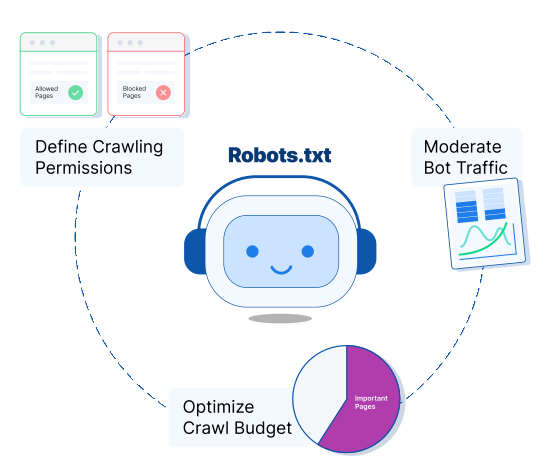 Robots.txt plays a crucial role in managing the crawling of your site. It directs search engine crawlers on which pages they are allowed to crawl, ensuring the correct pages get indexed and appear in search results.
Moreover, robots.txt helps regulate the number of bots crawling your site at any given time. Without it, multiple bots crawling simultaneously could slow down your website’s performance. By setting up a proper robots.txt file, you can control and balance this crawling process to avoid overloading your site.
Control Crawl Permissions:
By optimizing your robots.txt file, you can make the most of your crawl budget—the portion of Googlebot’s resources allocated to crawl your website. It’s important to avoid wasting crawl budget on unnecessary pages like thank-you or form submission pages.
With the right robots.txt configuration, you can direct bots to the most valuable content, ensuring efficient use of your crawl budget while protecting your site’s performance.
How to Create a Robots.txt File
Creating a robots.txt file is simple, and you can use any basic text editor like Notepad or TextEdit. Avoid using word processors as they can alter the file format and affect its functionality.
Here’s a simple example of how a robots.txt file should be structured:
User-agent: Googlebot
Disallow: /nogooglebot/
User-agent: *
Allow: /
Sitemap: https://www.example.com/sitemap.xml
This is the basic structure of a robots.txt file. Let’s break down what each part means:
- User-agent: This specifies which search engine bot or crawler the rule applies to. You can list multiple user-agents on separate lines to manage access for different crawlers.
- Disallow: This indicates which pages or directories you don’t want the specified bot to crawl. The path must start with a slash (/) and should match exactly as shown in the browser’s URL.
- Allow: This tells crawlers which pages or sections they are permitted to crawl. It’s typically used to override a Disallow directive for specific subfolders or pages within a disallowed parent directory.
- Sitemap: This is an optional line where you can specify the URL of your website’s sitemap. Including this helps search engines know which content to crawl.
Important Guidelines for Creating a Robots.txt File:
- Name the file “robots.txt”: It’s essential to name the file correctly so that bots like Googlebot can recognize it.
- You can only have one robots.txt file: Google will only acknowledge one robots.txt file per website. Ensure there’s only one in your website’s root directory.
- Place the file in your website’s root directory: For your robots.txt file to be recognized and processed, you must upload it to your website’s root directory.
For additional guidance on creating a robots.txt file, visit Google Search Central.
2.Sitemaps: A Beginner’s Guide to Technical SEO
Sitemaps serve as a roadmap for users, helping them find exactly what they’re looking for. They provide a convenient overview of all the pages on your website, making it easier for visitors to view and navigate your content. Additionally, sitemaps play a crucial role for search engines by signaling to Google which pages and files are important, ensuring smooth indexing and navigation for crawlers.
Types of Sitemaps
There are two primary types of sitemaps designed to assist both search engine crawlers and website users:
XML Sitemaps
XML, which stands for Extensible Markup Language, is used by crawlers to index your site. An XML sitemap contains key information about each page, such as:
- Frequency of page updates
- The date a page was last modified
- The relative importance of a URL compared to others on your site
- Priority of a page in relation to others
- Available alternate language versions of the page
- Image locations on the site
- Details like the running time or rating of a video on the page
HTML Sitemaps
When creating an HTML sitemap, always prioritize the user experience. This type of sitemap acts like a table of contents, with clickable links organized for easy navigation, similar to the sitemap of WebFX. An accessible sitemap is not only beneficial for users but also makes it easier for search engines to crawl your site, enhancing SEO.
HTML sitemaps establish a clear hierarchy and connection between your pages, helping to keep your website structured and organized—especially as it grows. They also function as an efficient project management tool, allowing you to monitor all aspects of your website’s content.
- Includes news article titles and publication dates
Why Sitemaps Are Important for SEO
Though optional, sitemaps are a powerful tool for improving search engine optimization. Crawlers value efficiency, and sitemaps deliver just that. When search engine bots can quickly and easily scan your website, it can significantly enhance your SEO and improve your chances of ranking higher on search engine results pages (SERPs).
Sitemaps are especially beneficial for large or complex websites, as they help crawlers quickly access your entire site—including recently updated or newly added pages.
These lists are particularly useful for websites with a large archive of isolated content. If your pages lack numerous natural links or references, a sitemap can help Google discover them.
Additionally, having a sitemap can improve your rankings if your website features rich media content. Google can leverage this information to enhance your visibility in image, video, and news search results.
How to Create a Sitemap
Creating an XML sitemap manually is relatively straightforward. If you’d prefer not to do it manually, there are sitemap generators available to simplify the process. For example, Screaming Frog offers an easy-to-use built-in sitemap generator. Alternatively, if you’re using WordPress, Yoast SEO provides a convenient option, or you can opt for paid tools like Slickplan.
If you don’t want to use a generator, you can create the sitemap manually. All that’s needed is a text file, which you can save with the .xml extension.
To start, add the following code to your new .xml file:
<?xml version=”1.0″ encoding=”UTF-8″?>
<urlset xmlns=”http://www.sitemaps.org/schemas/sitemap/0.9″>
This code declares that the file will act as a sitemap, signaling to search engines that it contains a list of URLs (<urlset>).
After this, you can begin adding your URLs. There are three essential tags to use in sitemaps:
- <loc>: Specifies the location of your content. Replace the example URL with your actual page URL.
- <lastmod>: Indicates when your content was last updated. This helps search engines know when to re-crawl your page.
- <changefreq>: Describes how often your content is updated. This tag helps search engines determine when it’s time to re-crawl the page.
While only the <loc> tag is required, adding the other tags ensures that your content is crawled and indexed more effectively. It also helps prioritize crawling for your most important pages.
If done correctly, the structure of the identified URLs in your XML sitemap file should look like this:
<url>
<loc>http://www.exampleURL.com/</loc>
<lastmod>2021-12-24</lastmod>
<changefreq>monthly</changefreq>
<priority>1.0</priority>
</url>
You can repeat this structure for up to 50,000 URLs, and it’s important to ensure that every page on your site (except for ‘Thank You’ pages, duplicate pages with minimal differences, etc.) is included in the sitemap. Once all the URLs are added, make sure to close the document with </urlset> to indicate the end of the list to search engines and prevent errors.
At the end, your XML sitemap will look something like this:
<?xml version=”1.0″ encoding=”UTF-8″?>
<urlset xmlns=”http://www.sitemaps.org/schemas/sitemap/0.9″>
<url>
<loc>http://www.exampleURL.com/</loc>
<lastmod>2021-12-24</lastmod>
<changefreq>monthly</changefreq>
<priority>1.0</priority>
</url>
<url>
<loc>http://www.exampleURL.com/blog/example/</loc>
<lastmod>2022-02-04</lastmod>
<changefreq>daily</changefreq>
<priority>0.8</priority>
</url>
</urlset>
By following these steps, you’ll have successfully created a sitemap for your website. The next step is to submit it.
How to Manually Submit Your XML Sitemap
The first step with your new XML sitemap is to add it to your robots.txt file. This file contains instructions for search engines on how to crawl your site and defines which pages should be excluded.
Fortunately, this process is straightforward. Simply copy and paste the following line of code into your robots.txt file, replacing “exampleURL” with your own domain:
Sitemap: <http://www.exampleURL.com/sitemap.xml>
Once that’s set up, you can submit your XML sitemap directly to search engines via Google Search Console or Bing Webmaster Tools. These two search engines are the most widely used, so they should be your main priority.
Submitting a Sitemap via Google Search Console
- Navigate to the Overview tab and click on Sitemaps.
- You’ll then be prompted to enter the URL of your XML sitemap. Once entered, click Submit.
Submitting a Sitemap via Bing Webmaster Tools
- On the Bing Webmaster Tools dashboard, select Sitemaps.
- In the top right corner, click on Submit a Sitemap.
- Paste your XML sitemap URL into the provided field and click Submit.
- After submission, your sitemap will appear in the log under Sitemap details.
3. Domain Name
Your domain name is the address of your website, essentially the URL people use to access your business’s online presence. For instance, if your website is for Hank’s Office Supplies, your domain name might be hanksofficesupplies.com.
Why Your Domain Name is Important for SEO
Your domain name plays a key role in the user experience (UX) of your website, which is a crucial factor for SEO. Google aims to provide users with the best possible website experience, so ensuring your site offers a seamless UX is vital.
How Does Your Domain Name Affect UX?
A domain name that is short and easy to remember helps users return to your website and share it with others. A simple URL minimizes the chances of errors or confusion, which not only enhances user experience but also improves SEO performance.
Tips for Choosing the Right Domain Name
Selecting the right domain name is essential for boosting user experience and SEO. Here are some tips to guide you in making the right choice:
Pick the Right Top-Level Domain (TLD) Extension
The TLD is the suffix that appears at the end of a URL, such as .com, .org, .gov, etc. While .com is the most commonly used, it’s important to choose a TLD that aligns with your business or organization.
Common TLD Options
- .com – Widely used for almost any website or business
- .net – Used for tech companies, networks, or similar entities
- .org – Typically for nonprofits and open-source projects
- .gov – Reserved for government agencies
- .edu – Reserved for educational institutions
- Country-Specific Extensions (e.g., .ca, .co.uk) – Used by organizations and businesses in specific countries
Example
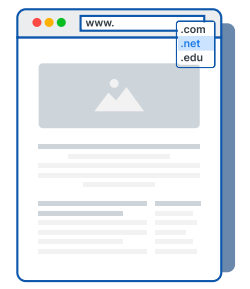 Selecting the appropriate TLD is crucial for your online identity. For nonprofit organizations, using the .org TLD is often a better choice since it is specifically designed for non-commercial entities. This helps communicate your nonprofit status more clearly compared to a .com TLD.
If you’re operating outside the United States, it might be beneficial to choose a country-specific TLD. For instance, in the United Kingdom, the .co.uk TLD can help reinforce your local presence.
- .com
- .net
- .edu
The TLD you choose should align with the message you want to convey to your audience. For most businesses, the default is to go with a .com TLD, unless you’re a government (.gov), nonprofit (.org), or educational institution (.edu).
Keep Your Domain Name Concise
As mentioned before, the length of your domain name can affect the user experience. A domain that’s too long or complicated can be hard for people to recall. It’s advisable to keep your domain short and simple for easier memorability.
Avoid Numbers, Hyphens, and Special Characters
When selecting a domain name, steer clear of using numbers, hyphens, or special characters. These elements can make it challenging for users to remember or type the domain correctly.
For example, using a number like in “Grills2Go” can cause confusion. People may mistakenly type it as “GrillstoGo,” “GrillstooGo,” or “GrillsTwoGo,” resulting in lost traffic.
Hyphens or special characters can also lead to similar issues since users may forget their exact placement. Keeping your domain name simple and clean is key for making it memorable.
4. Site Structure
Website structure, also known as site architecture, is a vital aspect of technical SEO that directly influences your search engine ranking. It refers to how you organize and group your web pages to help both users and search engine bots understand the relationships between them.
Why is site structure important for SEO?
A well-organized site structure improves crawlability, which is essential for SEO. By arranging your pages logically, you make it easier for search bots to crawl your website and grasp its content. This also ensures that your site is navigable, which enhances the overall user experience and SEO performance.
When your website is easy to crawl, it becomes simpler for search engines to index your pages and have them appear in relevant search results. Furthermore, a well-organized and structured website enables users to quickly find the information they’re looking for. When users can easily access what they need, it enhances their experience, which in turn improves your SEO.
How do I optimize my site structure?
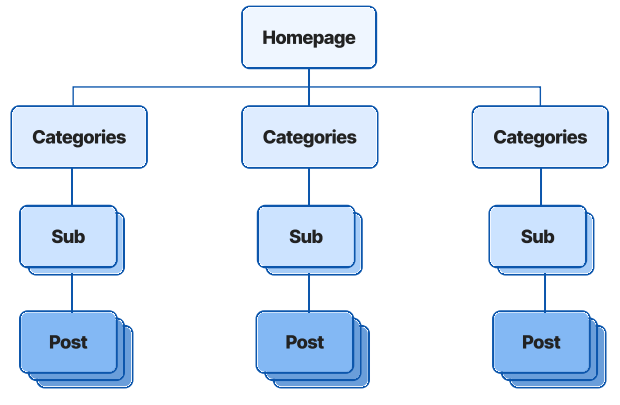
The most effective way to organize your website is by adopting a pyramid structure for your pages. This pyramid begins with your homepage and branches out into key pages, such as product or service pages. From there, it further splits into categories and subcategories, with specific pages or blog posts at the lowest level.
Homepage
→ Categories
→ → Subcategories
→ → → Posts
In essence, it’s about constructing a pyramid that illustrates how pages are connected around specific topics.
Here’s an example using a lawn care company:
- Core page: Lawn Maintenance Services
- Category: Seasonal Maintenance Services
- Subcategory: Leaf Removal Services
- Post: Why Leaf Removal is Important
For example, a core page could focus on your lawn maintenance services. Beneath that, a category might cover seasonal maintenance services. A subcategory could dive into leaf removal, which then connects to a blog post explaining why leaf removal is essential.
This structure clearly shows how all pages are interconnected, offering better context for both users and search engines.
When building your site structure, consider how your pages relate to one another. Think about which pages should serve as your “core” pages and how the content beneath those pages should be categorized.
5.URLs
A URL, often referred to as a web address, defines the location of a webpage on the internet. It serves as a human-readable alternative to the numeric IP addresses that were once used by computers to communicate with servers. URLs help guide visitors to specific pages on your website.
Components of a URL
The structure of a URL is made up of several components. Here’s a breakdown of each one:
- Protocol
The protocol, also known as the scheme, is the first element of a URL. It indicates the method used to transfer data over a network. Secured websites typically use the HTTPS protocol, while unsecured websites use HTTP. - Subdomain
A subdomain is placed immediately after the protocol and is often used to organize a website’s content for specific purposes. The most common subdomain is “www,” which signifies a connection to the World Wide Web. - Domain Name
The domain name, or second-level domain (SLD), is the main name of your website. For example, in “webfx.com,” “webfx” is the domain name, and in “google.com,” “google” is the domain name. These names are typically unique, though there may be variations depending on the domain extensions. - Domain Extension
The domain extension, also referred to as the top-level domain (TLD), appears after the domain name. Examples include “.com,” “.org,” and “.net.” While traditional extensions like “.com” dominate the web, newer TLDs are becoming more popular as the global number of websites increases. - Path
The path specifies the precise location of a page, file, post, or other resources on a website. Many sites use paths to help define their navigation structure.
A typical URL might look like this: https://www.webfx.com/blog. Breaking it down:
- The “https” represents the protocol.
- “www” is the subdomain.
- “webfx” is the domain name.
- “blog” refers to the path.
Why Are Optimized URLs Important for SEO?
While URLs aren’t a direct ranking factor for Google, they still play a significant role in your SEO efforts.
URLs impact how users interact with your site. If a URL is unclear or confusing, users are less likely to engage with it. Ambiguous URLs can make it difficult for users to navigate your site and can also result in them forgetting the link altogether.
By optimizing your URLs, you provide a better user experience, which can ultimately boost your SEO performance.
How to Optimize URLs
Here are some best practices to optimize your URLs:
- Incorporate Keywords: Including relevant keywords in your URLs helps set expectations for the page content and improves the user experience as people navigate your website.
- Keep URLs Short: Shorter URLs are easier to remember. A more concise URL enhances usability and navigation.
- Use Dashes Instead of Underscores or Spaces: When creating URLs, opt for dashes to separate words. Google and other search engines recognize dashes as word separators, whereas underscores can be misinterpreted. Using dashes ensures readability and better search engine recognition.
6. HTTPS
Another key element of technical SEO is ensuring your website is secure, which is reflected in the “s” in HTTPS. HTTPS signifies that any user-submitted information on your site is encrypted and secure.
Why HTTPS Matters for SEO
Security is essential for a positive user experience. With over 2,200 cyberattacks occurring daily, securing your website is critical to protecting your users’ data and maintaining trust.
People are reluctant to share sensitive information, such as their address or credit card details, on your website if it lacks security. If visitors notice your website is insecure, they’re likely to leave and choose a competitor that offers a safer experience.
Therefore, HTTPS is essential for ensuring a positive user experience and retaining visitors, which, in turn, influences your SEO performance.
How to Secure Your Website
The simplest way to secure your website is by obtaining a Secure Sockets Layer (SSL) certificate. This certificate ensures that any data exchanged between your website’s server and the user’s browser is encrypted.
The first step is to select the appropriate SSL certificate for your site. There are different types of SSL certificates, and the one you choose will depend on your business needs.
SSL Certificate Types
| Type | Description | Best For |
|---|---|---|
| Extended Validation (EV) | Most advanced and costly, encrypts highly sensitive information like payment data. | Ecommerce businesses requiring top-tier security |
| Organization Validated (OV) | Verifies site authenticity and provides moderate security. More affordable than EV. | Businesses needing moderate security |
| Domain Validation (DV) | Offers the least encryption but is the fastest to validate. | Simple websites requiring basic encryption |
| Wildcard SSL | Secures a base domain and unlimited subdomains. | Websites with multiple subdomains |
| Multi-domain SSL | Secures several domains or subdomains under a single certificate. | Websites with multiple domain names |
| Unified Communications (UCC) | Secures multiple hostnames with a single certificate. | Businesses with multiple hostnames |
You can obtain SSL certificates from any Certificate Authority (CA), including well-known providers like Comodo SSL, GeoTrust, and GlobalSign.
After obtaining a validated SSL certificate from your Certificate Authority, the next step is to install it on your website. Following installation, you’ll need to set up a redirect from the old version of your site (using HTTP) to the new, secure HTTPS version.
7. Redirects
Redirects are used to direct both users and search engines to a different URL than the one originally clicked. If a page has moved to a new address, redirects ensure that visitors and search engine crawlers are properly directed to the correct location.
Why are redirects important for SEO?
Redirects play several key roles in SEO, such as:
- Redirecting traffic: They are essential for maintaining a website’s functionality when pages are moved or deleted. Redirects also help transfer link equity to the appropriate pages when they’re relocated.
- Preserving page authority: When you move or delete a page, setting up a redirect is crucial to retain the page authority tied to backlinks from other sites. Without this, you risk losing search engine rankings.
- Enhancing user experience: A smooth user experience is crucial for building trust with your audience. Redirects ensure that users aren’t directed to broken or duplicate pages, which could appear unprofessional and hurt your site’s reputation.
- Forcing HTTPS: In cases where a website is accessible via both HTTP and HTTPS, a redirect can guide users to the secure HTTPS version. Since website security is a critical SEO ranking factor, redirecting to HTTPS can provide a significant SEO boost.
“Redirects give SEOs a powerful tool for optimizing site structure, consolidating content, and managing migrations to new domains.”
Types of Redirects
There are several types of redirects commonly used on websites, but these two are the most frequently utilized:
301 Redirect
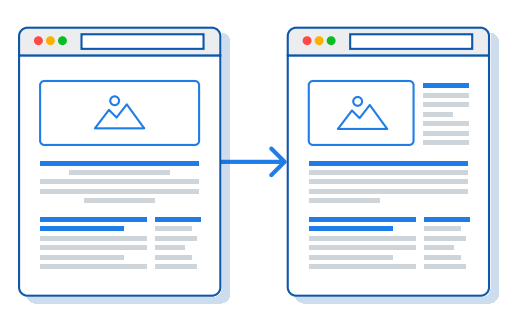 Meaning: Moved Permanently
A 301 redirect is the most widely used method for redirecting URLs. It offers a seamless and effective way to send visitors to a new address when a website permanently changes its URL. Search engines use this redirect to re-route traffic from the old URL to the new one by updating their index.
This type of redirect is ideal when you’re permanently moving a page, such as switching your website from “HTTP” to “HTTPS,” with no intention of reverting to the old URL.
302 Redirect
Meaning: Found and Moved Temporarily
A 302 redirect indicates a temporary move. It directs users from one page to another while signaling that the original URL will return in the future. The old URL retains its indexing and continues to rank in search engines.
You’ll use a 302 redirect when you need to temporarily send traffic to a different page. For instance, if you’re undergoing significant updates to a core service page, you may want to redirect visitors to a different page until the new one is ready for launch.
How to Set Up Redirects
There are several ways to implement HTTP redirects:
- Plugins: If you’re using WordPress, plugins like Redirection or Yoast can help you set up redirects easily.
• Content Management System (CMS): Some CMS platforms, like Wix or Joomla, have built-in redirect features, so you won’t need to install additional plugins.
• .htaccess File: This method involves editing your website’s code by adding plain text to the .htaccess file. It’s recommended only for advanced users, as incorrect changes can cause issues with your site’s functionality.
8. Mobile-Friendliness
 A Beginner’s Guide to Technical SEO
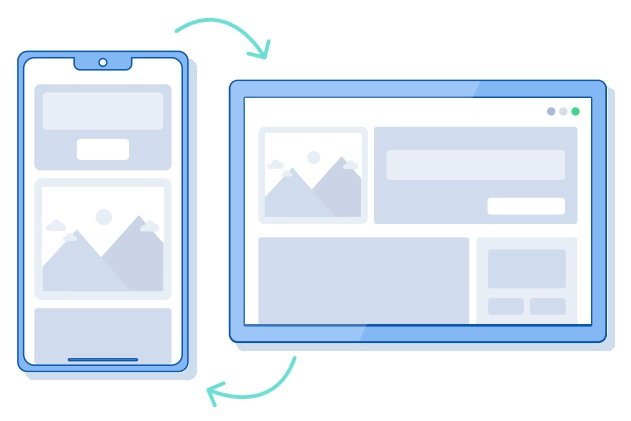
Mobile-friendliness refers to the ability of your website to function smoothly across all devices, including smartphones and tablets. Implementing a mobile-friendly design ensures that your website adjusts to the screen sizes of these smaller devices without sacrificing user experience.
Why is Mobile-Friendliness Important for SEO?
Mobile-friendliness plays a crucial role in SEO, primarily because Google will not index your website if it’s not optimized for mobile. Google made this clear in July 2024, and it’s now fully enforced.
Why is this significant for SEO? For your website to appear in search results, Google needs to crawl and index it. If your site isn’t mobile-friendly, it won’t be indexed, meaning your business won’t show up in any search results.
How to Build a Mobile-Friendly Website
The simplest way to create a mobile-friendly site is by incorporating responsive design. Responsive design allows your website to automatically adjust to different devices, providing users with a seamless experience regardless of what they’re using.
If your website is built on a platform like Squarespace, Shopify, or WordPress, it’s likely already responsive. These popular website builders often offer mobile-friendly templates to ensure your site displays well on any device.
9. Page Speed
Page speed refers to how quickly your website loads when a user visits it. It measures the time it takes for a page to display all of its content in a web browser after a link is clicked or a request is made.
A vital aspect of page speed is Google’s Core Web Vitals. These are user experience metrics that assess loading performance, visual stability, and interactivity of your pages.
A Breakdown of Core Web Vitals Metrics:
Largest Contentful Paint (LCP):
LCP measures how fast the largest content element on your page loads after a user visits your website. A good LCP score is 2.5 seconds or less.
Interaction to Next Paint (INP):
INP measures how responsive your website is when users interact with it—whether it’s clicking a button or adding an item to the cart. An ideal INP is less than 200 milliseconds.
Cumulative Layout Shift (CLS):
CLS assesses the visual stability of your website. This metric tracks unexpected shifts in layout that disrupt the user experience. A good CLS score is below 0.1.
Why Site Speed is Crucial for SEO:
Site speed is one of the most important ranking factors for Google. It measures how long it takes for a page to load during a sample of site views. To achieve good site speed, you need fast load times.
Page speed plays a key role in search engine rankings because it directly affects user experience. If your website takes too long to load, users will leave your page and head to a competitor’s site instead.
Thus, maintaining a fast load speed is vital for retaining visitors and enhancing your SEO.
How to Improve Your Website’s Page Speed:
To boost your website’s load speed, start by entering your website’s URL into Google’s PageSpeed Insights tool: https://pagespeed.web.dev/.
This tool will help you identify areas for improvement to enhance your website’s load speed. Here’s how Google defines optimal load speed (LCP):
- Good: 2.5 seconds or less
- Needs Improvement: Between 2.5 seconds and 4 seconds
- Poor: More than 4 seconds
Common ways to boost page speed include:
Minifying CSS, JavaScript, and HTML: Simplify your code by removing unnecessary characters such as spaces and commas. Additionally, eliminate unused code and comments.
Compressing CSS, HTML, and JavaScript files: For files larger than 150 bytes, use compression tools like Gzip to reduce their size and improve page load times.
Compressing and optimizing images: Large images can significantly slow down loading times. Optimizing and compressing images will help speed up your website.
Choosing a reliable hosting provider: A slow server can negatively impact your website’s loading speed. Ensure you select a hosting company that guarantees fast load times.
You can also consider investing in page speed optimization services from a professional agency to have a dedicated team enhance your website’s speed.
10. Schema Markup
Schema markup is a technical SEO feature that provides context to search engines about the content on your website. It’s a type of structured data that explains the meaning behind the pages and elements on your site.
Why is schema markup important for SEO?
Schema markup is crucial because it helps search engines better understand your website’s content. By implementing schema, you provide extra context for search engine crawlers, which improves their ability to assess your pages’ relevance. Additionally, schema tags allow you to create more detailed search listings, which can attract more clicks and traffic, ultimately boosting your SEO.
How to Create Schema Markup
The process of creating schema markup varies depending on the type you’re working with. One of the simplest methods is to use Google’s Structured Data Markup Helper. This tool guides you through the steps for creating different types of schema for the pages on your website.
For specific schema types, like FAQ or HowTo, TechnicalSEO.com’s schema generator is a great resource.
After following the steps provided by the schema generator, you’ll need to integrate the schema markup into your website. If you’re using WordPress, you can create a custom field to add your schema, or use plugins such as Yoast SEO for this purpose.
To ensure your schema is implemented correctly, use Google’s Rich Results Test tool to validate it.
Next Steps for Your Technical SEO
If you’ve read through this technical SEO guide and feel a bit overwhelmed, you’re not alone. Technical SEO involves a great deal of expertise to get it right. If you feel it’s too complex to handle on your own, you might want to consider enlisting the help of a professional SEO agency like DigiTotal.
An experienced SEO company can optimize all areas of your technical SEO, boosting your website’s search engine rankings.
Feel free to reach out to the DigiTotal team to learn more about how we can support you in managing your technical SEO.