






25 Tips To Increase Your Conversion Rate
Introduction to Conversion Rate Optimization
You’ve built a solid website that’s driving leads and contributing to your business success. Things are running smoothly, and there’s little to complain about. But just because everything seems to be working doesn’t mean it can’t be enhanced.
What if you could improve how many visitors sign up for your email updates, increase the number of items they buy, or boost the number of phone calls you receive? Imagine doubling or even tripling the actions you want visitors to take on your site. Wouldn’t that make you even more satisfied with your results?
Conversion Rate Optimization (CRO) is the key to enhancing your existing lead-generating efforts and uncovering opportunities for further improvement. With CRO, you can refine a well-performing website by pinpointing weak spots and strengthening what’s already working. In short, CRO helps turn a “good” website into a “great” one. You may be surprised by the improvements you can achieve through a bit of testing!
Why CRO Matters
CRO encompasses various elements of a website that can be tested. Essentially, any area where you want users to take action—like clicking a button or completing a form—can be optimized for better conversions.
A person’s brain plays a huge, often subconscious, role in influencing their decisions when interacting with a website. This subconscious influence could explain why red links are clicked more frequently than blue ones. Understanding which elements prompt users to take action is a critical aspect of CRO. By testing different features on your website, you may uncover a strategy to increase revenue with no more effort than what you’re already putting into your daily routine. Yes, more revenue with no additional work, apart from some initial testing.
That’s why we created this guide!
We want everyone to understand the power of conversion rate optimization and how it can transform your website. So, we’ve put together a free guide featuring our 25 best CRO tips, available to anyone who wants it.
In this guide, you’ll learn everything there is to know about CRO, along with tips we’ve compiled from our experience working with over 500 clients. Whether you’re new to conversion rate optimization or a seasoned A/B testing pro, this guide will provide actionable tips to help you boost your leads, phone calls, sales, and overall conversions.
Without further ado, here are our 25 best CRO tips!
Understanding Conversion Rate Optimization (CRO)
If you’re new to CRO, the first step is to learn how to apply some of these techniques to your website. Don’t worry, it’s easier than you might think!
(If you’re already familiar with the basics, feel free to skip to tip #2!)
Tip #1: Master the Basics
To test different elements of your website, you’ll need multiple versions of your page. These “A/B tests” — named after the “A” and “B” versions being tested — are shown to different segments of your audience, providing you with valuable data to improve your CRO efforts. A/B testing might seem complex, but luckily, there are many tools that simplify the process for you!
A/B Testing Tools
If you’re just starting with A/B testing and CRO, Google Content Experiments is a great, free option. It allows you to run A/B tests on your site, view results, and decide which version of your page or content performs best.
There are also paid tools that offer a more comprehensive experience for your testing needs. Options like Visual Website Optimizer and Optimizely are fantastic for streamlined, detailed CRO and A/B testing.
Why A/B Testing is Crucial for CRO
Testing is the core of CRO. It helps you figure out which version of your site performs better. A/B testing is the only way to determine what changes can boost your conversion rates. Don’t be discouraged if a new variation performs worse than your control version — simply revert to the original or test something else.
Since every website is unique, we can only provide suggestions and ideas, not precise answers. For example, we can’t tell you exactly how to set up your lead forms or what button color to use. It’s up to you to experiment and see what works best. Through testing, you’ll uncover valuable insights that can significantly enhance your conversion rates.
With that said, let’s dive into the next tips!
Improving Your Content
The content on your website plays a vital role. It’s how your audience learns about you, how they engage, and it significantly impacts their decision-making process. Enhancing your content with Conversion Rate Optimization (CRO) techniques can help you retain visitors longer.
Tip #2: Use Scannable Text
With decreasing attention spans in the digital age, making your text scannable is more important than ever. Consider using headings, subheadings, bullet points, lists, and bolded phrases to emphasize key points. This approach can encourage visitors to stay longer and increase the chances of conversion.
When users land on your site, a large block of text can overwhelm them, often prompting them to leave before reading. A more digestible, organized layout is far more inviting. Ask yourself: which one would you prefer to read?
Tip #3: Incorporate Headings
Before the web, newspapers and magazines used headlines and subheadings to introduce new topics and divide lengthy articles. These breaks made it easier for readers to skim and quickly grasp the key points. Websites function similarly by using headings to guide users.
Utilize heading tags in HTML (H1, H2, H3, and H4) to help users navigate your site, especially those who prefer to skim. Since not all visitors will read every word, the strategic placement and formatting of headings can significantly improve conversions by drawing attention to important content.
Visual Appeal
Text isn’t the only element that matters on your website. Visual content plays a crucial role too, and not just because it helps break up large sections of text. Here’s how you can test boosting your revenue with images and videos.
Tip #4: Incorporate More Images
Similar to scannable text, images help break up long blocks of content, boosting engagement and lowering bounce rates. They also give visitors a quick preview of what a page is about, which can encourage them to stay longer and explore more of your site.
Consider adding more images to your pages and see if they positively impact your metrics. If you’re lacking original photos, many websites offer free or low-cost images that you can incorporate into your content. To help get you started, check out this list of our top eight stock photo sources.
Tip #5: Utilize Videos
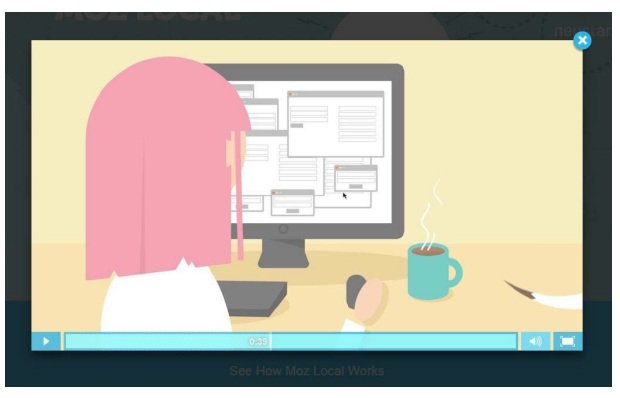
Just like images, videos can significantly boost engagement, particularly when they are highly relevant. Short videos are especially effective at explaining concepts, showcasing products, or providing instructions. Consider experimenting with pages that feature videos to see how they perform compared to those without.
Keeping Their Attention
Are distractions causing your website visitors to leave? These two tips can help you hold the attention of your potential leads or customers longer, increasing the likelihood they’ll convert.
Tip #6: Minimize Distractions
Does your site feature popups or display excessive ads in sidebars or other areas? Consider removing them temporarily to observe how your other page elements perform. Distractions can unknowingly push visitors away, and aggressive popups may even annoy users to the point of leaving.
While removing that popup might result in fewer newsletter signups, it could also help prevent visitors from leaving your site prematurely, potentially before making a purchase or completing a valuable form. Think carefully about which type of conversion holds more value for you in the long term.
Tip #7: Simplify Visitors’ Actions
If your goal is for visitors to complete a specific form or make a purchase at the end of the checkout process, limit their available options to focus their attention.
By removing navigation during checkout or on forms, you make it less likely that a visitor will be distracted or click away from completing their goal.
Site Speed
Numerous studies highlight the significant impact speed has on a website. Reducing load times offers tremendous benefits, not only for SEO but also for user experience. For example, Amazon found that for every 100-millisecond improvement in load time, their revenue increased by 1%!
Tip #8: Boost Your Site Speed
Website visitors expect fast-loading pages, and if your site is sluggish, you’re potentially losing revenue. You can enhance your site’s performance and speed by implementing some or all of the following strategies:
- Upgrade your server or hosting: Ensure it can handle more visitors, especially during peak times like the holiday shopping season.
- Compress images: Instead of resizing images with HTML, reduce their file sizes to improve loading times.
- Use lazy loading: Implement lazy loading for images, so they only load as users scroll through the page (perfect for landing pages, blog posts, and long-form content).
- Implement a CDN: A Content Delivery Network (CDN) delivers your website content from the server closest to each user, reducing load times and ensuring your site stays active even during downtime.
- Minimize redirections and 404 errors: Reduce or eliminate unnecessary redirects and “Not Found” errors, which can cause small but noticeable delays in page loading.
For a list of 26 useful tools that can help speed up your website, check out this roundup on our blog.
Buttons
Most of your calls to action will come in the form of buttons, which signal to users that they can click for more information. Here are four conversion rate optimization (CRO) strategies you can apply to enhance their performance:
Tip #9: Refine Button Text
The wording you choose for your buttons can significantly impact user behavior. Common button texts like “submit” or “go” often underperform. Make sure your button text clearly communicates the action, and experiment with different phrases to find the one that leads to the highest conversion.
Tip #10: Experiment with Button Colors
The color of your buttons plays a huge role in grabbing attention. Certain colors naturally stand out more, and there’s psychology behind color choices that you can leverage. Try out different colors to discover which one works best for your audience.
Tip #11: Adjust Button Placement
The way your page is organized can guide visitors to take action. Does placing a button on the left side of a form perform better than one on the right? Test various positions to see if it influences user engagement.
Tip #12: Enlarge Button Size
Not getting enough clicks? It could be that your button needs more visibility. Try increasing its size! While it may feel a bit bold, sometimes smaller buttons get overlooked, and making them larger can significantly boost clicks.
Forms
For businesses that don’t sell online, forms are essential. Without the leads and inquiries they generate, your online presence could lose its momentum. However, even the most well-optimized forms can be fine-tuned for better results. Here are two strategies to help improve your form conversion rates:
Tip #13: Experiment with Form Length
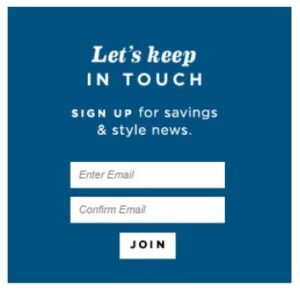 Ever visited a website, seen a lengthy sign-up form, and immediately clicked the back button? We’ve all been there. Sometimes, simplicity is key, and a shorter form could work better for your business. Try asking for less information initially, unless every field is absolutely necessary.
Tip #14: Test Form Options
Making small changes can sometimes lead to big improvements. Marking a field as “optional” might boost conversion rates. You might also discover that enlarging the fields or giving visitors more space to share their comments increases submissions. Alternatively, switching from a dropdown menu to radio buttons could lead to more responses.
Test different options on your forms. Remember, even the smallest changes can make a difference! Even if you don’t see an immediate change, at least you’ve tested it.
What would you like to discuss next?
Trust Factors
Website visitors can be naturally skeptical, particularly when you’re promoting something remarkable. The more you can establish your credibility, the better your chances of gaining their trust. These suggestions will help you test various trust elements and pinpoint the strategies that make visitors perceive you as reliable.
Tip #15: Showcase Reviews and Testimonials

If any of your customers have left positive feedback about your business, ask for permission to feature it on your website. In many cases, prominently displaying reviews and testimonials can significantly increase both clicks and conversions.
Tip #16: Leverage Social Proof
Social proof refers to any third-party endorsement that adds credibility. A common form of social proof is displaying social media “counters,” showing how many times a piece of content has been liked or shared. If your visitors are easily influenced, social proof can be a powerful tool to convince them you’re worth their time and investment.
For more insights on how to use social proof effectively, check out this blog post.
Tip #17: Incorporate Trust Badges
Do you have privacy or security certifications on your website? Displaying their logos or badges prominently can reassure visitors. Familiar logos can make new visitors feel more secure, whether they’re browsing or shopping.
Tip #18: Add Award Badges
Similar to trust badges, showcasing logos from awards or recognitions you’ve received can boost your credibility. Consider placing them in a visible spot or in less obvious locations, like a sidebar, footer, or a dedicated “Awards” page.
Pricing and Value
Your website visitors are always looking for a great deal. Even if your prices are competitive, there’s always the risk that they might look elsewhere. Here are three CRO tips to help keep them engaged and on your pages longer.
Tip #19: Implement Price Anchoring
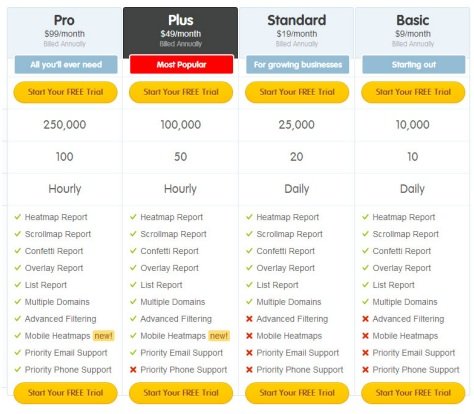 If you offer multiple service plans or product versions, price anchoring can make your prices appear more appealing. By drawing attention to your higher-priced options, the lower-priced ones will seem much more reasonable in comparison.
Tip #20: Craft a Strong Value Proposition
A value proposition is a brief statement explaining why someone should choose your business over a competitor’s. If you don’t have one yet, test a few variations until you find the one that resonates with your audience.
Your value proposition can be concise or more detailed, but it should clearly highlight what makes your offer a better value. Be specific! For instance, which sounds more compelling: “we’ll help you save money” or “we’ll save you $100 annually”?
Tip #21: Provide a Guarantee
Want to increase trust and keep visitors engaged? Offer some form of guarantee. It not only provides peace of mind but also signals that you’re confident in your product or service. A guarantee reinforces the idea that the great deal you’re offering is legitimate.
Calls to Action
Website visitors can be wary, especially when you’re promoting something remarkable. The more you can do to build their trust, the better. These suggestions will help you test trust factors and pinpoint the moments when visitors are most likely to view you as credible.
Tip #22: Experiment with Different Calls to Action
You might think “submit” is a solid call to action, but it’s often not the most effective. Test a variety of CTAs to see which ones resonate with your audience. For forms, providing clarity on what happens next can be very helpful—phrases like “hear from customer service” or “get a free quote” can work wonders.
HEAR FROM AN EXPERT
Tip #23: Create a Sense of Urgency
We understand that you want visitors to submit that form or complete their purchase right away… but they might ask, “What’s the hurry? We can always come back later.”
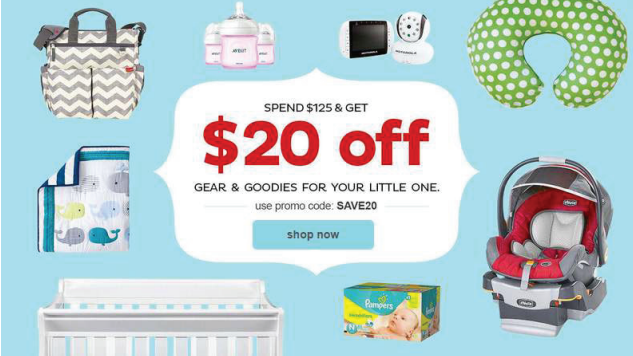
To prompt immediate action, create a sense of urgency. This doesn’t mean using flashing colors or alarming messages, but simple phrases like “buy now” can often increase conversions more than just “buy,” and “act now before it’s too late” can be far more persuasive than a standard “register.”
Specific Page Strategies
Website visitors often approach with skepticism, especially when you’re promoting something extraordinary. The more you can do to establish trust, the better. These tips will guide you in testing trust factors and help you pinpoint the point at which visitors begin to view you as credible.
Tip #24: Leverage Landing Pages
If you’re running PPC ads or regularly getting traffic from external websites through link building, creating targeted landing pages could help quickly guide visitors to their intended destinations. You may find that visitors are more likely to convert when they don’t need to search for the subject of your ad. Additionally, a dedicated landing page created for a specific campaign could lead to significantly higher sales.
Tip #25: Optimize “Thank You” Pages
“Thank you” pages typically appear after a visitor signs up, makes a purchase, or completes a form. At first glance, it may seem counterintuitive to A/B test a page that appears after a conversion.
However, these pages offer valuable opportunities for further engagement. You can use them to encourage visitors to connect with you on social media or explore additional pages on your website. Leaving these pages underutilized is a missed opportunity!
Remember what we emphasized at the start of this guide: Conversion Rate Optimization (CRO) can transform “good” into “great.” So even if you already have a thank you page or have secured a conversion, a little optimization could make it even more effective!
Conclusion
As these tips have shown, making even small adjustments to your website can lead to significant improvements in your conversion rate. While A/B testing might seem like a lot of work, the results can be highly rewarding.
If you’re new to Conversion Rate Optimization (CRO) and feeling a bit overwhelmed, it’s best to start small. Aim for one or two tests per month, or whatever pace feels right for you. Resist the temptation to check results too frequently—wait until the tests are complete and you have a solid set of data to draw insights from. If there’s no clear winner, don’t worry—feel free to try again or experiment with something different.
Keep in mind: what works for others might not work for you. Your website is one of a kind, so don’t hesitate to test new ideas, even those you haven’t seen before, to make the most of each visitor. Best of luck!
If you’re excited about A/B testing but lack the time, DigiTotal offers a range of affordable conversion rate optimization plans tailored to any budget. Our plans include quarterly or monthly testing and expert guidance from a dedicated CRO professional focused on boosting your website’s conversions.
To learn more about how DigiTotal can help or explore our other Internet marketing services, get in touch with us today. We’d love to hear about your business, your goals, and how we can support your success.