
What Is Anchor Text and Why Does It Matter for SEO in 2026?
 Anchor text is the clickable, visible text in a hyperlink — usually underlined and coloured differently from the surrounding copy — that takes a reader from one page to another. In HTML, it sits between the opening and closing <a> tags:html<a href=”https://www.digitotal.com.au/seo-services/“>SEO services Gold Coast</a>To a human, it’s a signpost. To Google’s crawlers — and increasingly to the large language models powering AI Overviews and generative answer engines — it’s contextual metadata. Anchor text tells the algorithm what the linked page is about, which keywords it should be considered relevant for, and how much authority to pass along from the linking page.This matters more in 2026 than it did five years ago. Google’s Search Generative Experience and competing AI engines don’t just crawl pages — they synthesise answers by cross-referencing how pages describe and link to one another across the web. Descriptive, well-placed anchor text increases the odds your content gets cited as a source inside an AI-generated answer, not just ranked in the traditional ten blue links.Book a free 15-minute introductory call
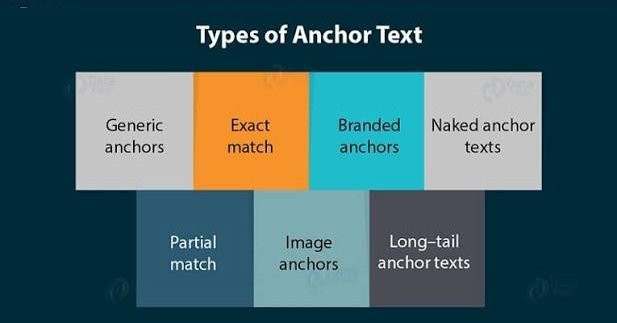
The 7 Types of Anchor Text You Should Know
Not all anchor text carries the same weight or risk. Here’s how each type works, with guidance on when to use it.- Exact Match Anchor Text
- Partial Match Anchor Text
- Branded Anchor Text
- Naked Link Anchor Text
- Generic Anchor Text
- Image Anchor Text
- LSI / Topical Anchor Text
Does Anchor Text Still Help SEO? Yes — But Only When It’s Earned
 Anchor text remains one of the clearest relevance signals Google has, but the rules changed permanently after the 2012 Penguin update, which specifically targeted sites that manipulated rankings through over-optimised, keyword-stuffed anchor text. Google’s own guidance today is explicit that link schemes built purely to manipulate PageRank — including excessive exact-match anchor text — violate its spam policies.The practical takeaway: anchor text should describe the destination page accurately and read naturally within a sentence. If you wouldn’t say it out loud to a colleague, don’t use it as a link.Read Google Search Central — SEO Starter Guide: https://developers.google.com/search/docs/fundamentals/seo-starter-guideBook a free 15-minute introductory call
Use Anchor Text to Breathe New Life Into Old Content
One of the most underused anchor text strategies is revisiting your older, already-published articles every time you publish something new. If a new post relates to an older one, go back and add a natural anchor link from the old page to the new one.This does two things:- It signals freshness. Google’s crawlers see that older content is still being actively maintained and connected to current topics, which supports better crawl frequency and can help preserve rankings.
- It keeps readers on your site longer. Every relevant internal link you add is another chance for a visitor to keep browsing instead of bouncing back to the search results — which improves engagement signals and increases the odds of a conversion.
Internal vs External Linking: Two Very Different Jobs
Anchor text does two distinct jobs depending on where the link points.Internal LinkingInternal links connect pages within your own site — for example, linking from this article to your SEO services page or a related post on technical SEO fundamentals. Internal anchor text helps Google understand your site’s structure and distributes authority (“link equity”) from your strongest pages to newer or underperforming ones.Be cautious with exact-match anchor text on internal links specifically — reusing the identical phrase across many internal links can look like manipulation and, in some cases, creates near-duplicate signals across pages targeting the same term.External LinkingExternal links point to third-party sites — ideally authoritative ones like government resources, established industry publications, or reference sites such as Wikipedia. Linking out to credible sources reinforces topical relevance (Google can see you’re citing legitimate authorities on the subject) and builds trust with readers, which supports the “Trustworthiness” pillar of Google’s E-E-A-T framework.As a rule of thumb: never link out from large blocks of highlighted text. Anchor text should be a phrase, not a paragraph.Book a free 15-minute introductory callHow to Create Anchor Text (Step-by-Step)
- Highlight the specific word or phrase you want to turn into a link.
- Copy the destination URL.
- Use your CMS or editor’s link tool (or right-click → “Insert Link”).
- Paste the URL and confirm — the text should now display as a link.
Use the Keywords You Actually Want to Rank For
This is where anchor text strategy connects directly to keyword strategy. If DigiTotal wants to rank for “SEO Gold Coast,” using that exact phrase as anchor text when linking to the relevant service page reinforces that target both internally and externally.This works in two ways:- On-site reinforcement: Google sees the anchor text and the destination page’s content align, strengthening topical relevance for that keyword.
- Off-site authority: When multiple external websites link to a page using similar, relevant anchor text, Google interprets that as independent confirmation of the page’s authority on the topic — a core part of how backlinks influence rankings.
Anchor Text Best Practices Checklist for 2026
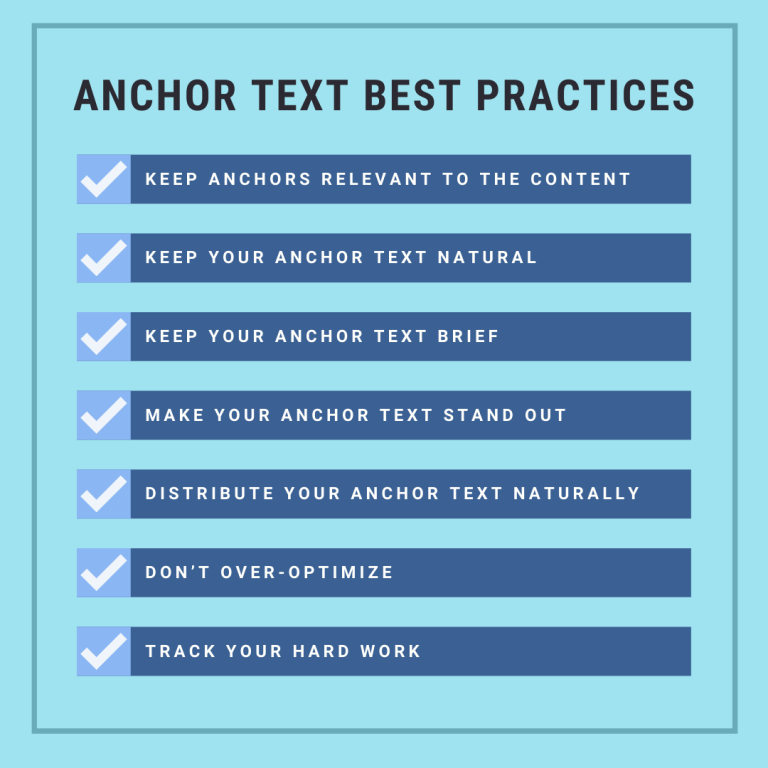
- Keep it relevant. Anchor text should accurately describe the destination page — mismatched anchor text confuses both readers and Google’s ranking systems.
- Vary your keywords. Repeating the same exact-match phrase across every link is a red flag for over-optimisation. Mix exact match, partial match, and topical variations.
- Write descriptive links. “Click here” tells a reader nothing. “See our on-page SEO checklist” tells them exactly what to expect.
- Track performance. Use Google Analytics (Behaviour > Site Content > All Pages, or the equivalent GA4 engagement reports) to see which internally linked pages actually retain traffic.
- Space links out naturally. Don’t cluster every link at the bottom of the article — place them where they add genuine value within the content.
- Favour follow links. Follow links pass ranking value; reserve nofollow for paid placements or links you can’t fully vouch for, in line with Google’s link attribution guidelines.
- Stick to a safe anchor text ratio. As a general benchmark, avoid having any single exact-match keyword phrase account for more than 5–10% of your total anchor text profile.
What to Avoid With Anchor Text
- Don’t overuse generic anchor text. “Learn more” has its place in a call-to-action, but it should never replace descriptive, keyword-relevant linking throughout your core content.
- Don’t link everything to your homepage. This concentrates authority in one place and gives Google far fewer pages to index and rank. Spread links across your most relevant deep pages.
- Don’t link to low-quality or spammy sites. Google’s spam policies specifically call out linking to or from untrustworthy sites as a ranking risk — and it damages reader trust in your brand.
- Don’t over-optimise. Flooding a page with keyword-rich links is both a spam signal to Google and a poor reading experience for humans.
Frequently Asked Questions
What is the ideal anchor text ratio for SEO?There’s no single official number from Google, but most SEO practitioners recommend keeping any one exact-match keyword phrase under roughly 5–10% of your total anchor text profile, with the majority being branded, partial-match, or natural variations.Does anchor text still matter for AI search engines like ChatGPT and Google AI Overviews?Yes. AI-driven answer engines cross-reference how pages are described and linked to across the web to determine which sources to cite. Descriptive, accurate anchor text increases the likelihood your page is understood correctly and surfaced as a credible source.Can too much anchor text hurt my rankings?Yes. Over-optimised anchor text — particularly repeated exact-match keyword phrases — was directly targeted by Google’s Penguin update and remains a spam signal under Google’s current link scheme guidelines.Should I use exact match anchor text for internal links?Sparingly. It’s fine occasionally, but repeating the identical phrase across many internal links can create near-duplicate signals and looks manipulative if overused.What’s the difference between anchor text and a hyperlink?A hyperlink is the underlying link mechanism (the href in HTML); anchor text is the visible, clickable label attached to that link.Book a free 15-minute introductory callConclusion: Anchor Text Is a Trust Signal, Not a Keyword Trick
Anchor text remains one of the most direct ways to tell Google — and increasingly, AI search engines — exactly what your content is about and why it deserves to rank. The sites that win in 2026 aren’t the ones stuffing exact-match keywords into every link; they’re the ones using clear, varied, genuinely useful anchor text that helps real readers navigate to real value.Treat every link as a small trust signal: relevant, natural, and worth clicking. Do that consistently across your internal and external linking, and the rankings tend to follow.Ready to put this into practice? Book a free 15-minute introductory call with DigiTotal’s SEO team and we’ll show you exactly where your anchor text strategy stands today.