

Introduction: Why Heading Tags Matter for Modern SEO
Creating high-quality content is not only about writing useful information. The way your content is structured also determines how easily users and search engines can understand it.
Heading tags are one of the most important elements of on-page SEO because they create a clear content hierarchy. They help visitors scan your website, find answers quickly, and understand the purpose of each section. At the same time, search engines like Google use heading structures as supporting signals to understand page topics, relationships between concepts, and overall content relevance.
In 2026, SEO has evolved beyond traditional keyword placement. Google’s AI-powered search experiences, including AI Overviews, focus on understanding context, expertise, user intent, and content usefulness.
A properly optimized heading structure helps search engines identify:
- The main topic of a webpage
- Important supporting topics
- Questions answered by the content
- The expertise behind the information
For businesses investing in SEO, headings are not just formatting elements. They are a strategic tool that improves user experience, accessibility, and search visibility.
This guide explains what heading tags are, how they impact SEO, common mistakes to avoid, and how businesses can optimize headings for Google Search and AI-driven search platforms. Click here to know more about Google Search Central SEO Starter Guide.
Book a 15-minute introductory call with DigiTotal
What Are Heading Tags in SEO?
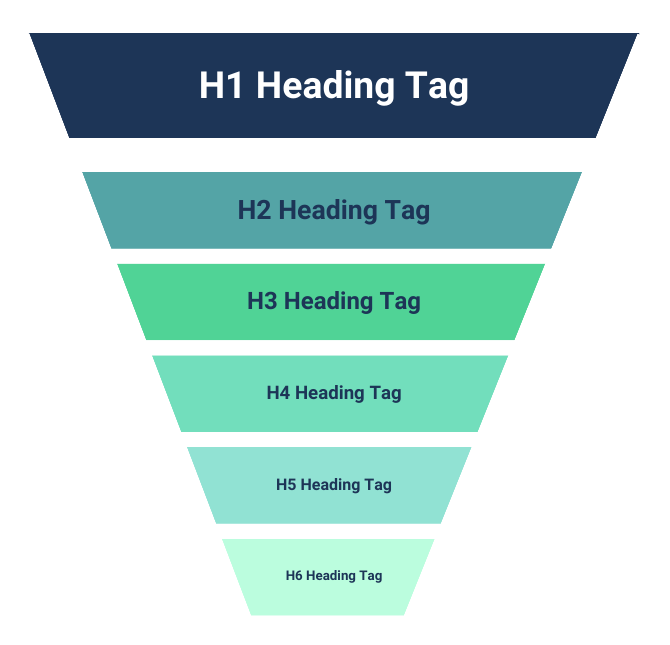
Heading tags are HTML elements used to organize and structure content on a webpage.
They create different levels of importance, helping both users and search engines understand how information is organized.
The six standard heading levels are:
- H1 – Main page heading
- H2 – Major section headings
- H3 – Supporting sections under H2
- H4 – Additional details within H3 sections
- H5 – Less commonly used deeper sections
- H6 – The lowest heading level
Example:
<h1>Complete Guide to SEO Heading Tags</h1>
<h2>Why Heading Tags Matter for Search Rankings</h2>
<h3>How H1 Tags Improve Content Understanding</h3>
<h3>Common Heading Optimization Mistakes</h3>
<h2>Best Practices for SEO-Friendly Headings</h2>
A simple way to understand heading hierarchy:
- H1 = Book title
- H2 = Chapters
- H3 = Sections inside chapters
- H4-H6 = Supporting details
A logical structure makes content easier to read and easier for search engines to interpret.
Why Are Heading Tags Important for SEO?
1. Heading Tags Help Google Understand Your Content
Search engines analyze multiple signals to understand a webpage. Heading tags provide additional context about what each section covers.
For example:
A page with the H1:
“Local SEO Services for Small Businesses”
and H2 sections such as:
- How Local SEO Improves Google Maps Rankings
- Google Business Profile Optimization
- Local Keyword Research Strategies
clearly communicates the page topic.
This helps Google understand relevance and connect your content with appropriate search queries.
However, headings are only one part of SEO. Rankings also depend on:
- Content quality
- Experience and expertise
- Website performance
- Internal links
- Backlinks
- User satisfaction
2. Headings Improve User Experience
Most online visitors scan content before reading everything.
A page without headings creates large blocks of text that are difficult to navigate.
Well-written headings help users:
- Find important information faster
- Understand content structure
- Stay engaged longer
- Navigate long articles easily
For example, a 3,000-word SEO guide becomes much easier to consume when divided into meaningful sections.
Better user experience supports SEO because Google prioritizes pages that satisfy search intent.
3. Heading Tags Improve Accessibility
Heading structure is essential for accessibility.
Users who rely on screen readers use headings to navigate websites quickly. A proper hierarchy allows them to jump between sections and understand page organization.
Good heading practices support:
- Screen readers
- Keyboard navigation
- Better website usability
Accessibility is also part of creating a high-quality digital experience.
H1 Tag: The Most Important Heading on a Page
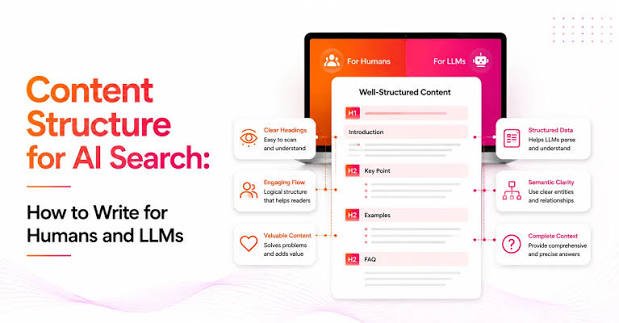
The H1 tag represents the primary topic of a webpage.
It is usually the first visible heading users see after landing on a page.
A strong H1 should:
- Clearly explain the page topic
- Match user search intent
- Include the primary keyword naturally
- Encourage users to continue reading
Example:
Weak H1:
“Welcome To Our Website”
Better H1:
“Professional SEO Services to Help Your Business Rank Higher on Google”
The second example immediately tells visitors what the page offers.
Best Practices for Writing SEO-Friendly H1 Tags
Use One Clear H1 Per Page
For most business websites, using one primary H1 creates a clear content structure.
It tells users and search engines what the page is mainly about.
Include Keywords Naturally
Your main keyword can appear in your H1, but avoid forcing keywords.
Good:
“WordPress SEO Services for Small Businesses”
Poor:
“Best Affordable Professional WordPress SEO Services Company Experts”
The second example looks unnatural and reduces readability.
Match Search Intent
Your H1 should answer the reason someone searched.
Example:
Search query:
“How much does SEO cost?”
Better H1:
“SEO Pricing Guide: How Much Does SEO Cost in 2026?”
This directly matches user expectations.
H1 Tags vs Title Tags: What Is the Difference?
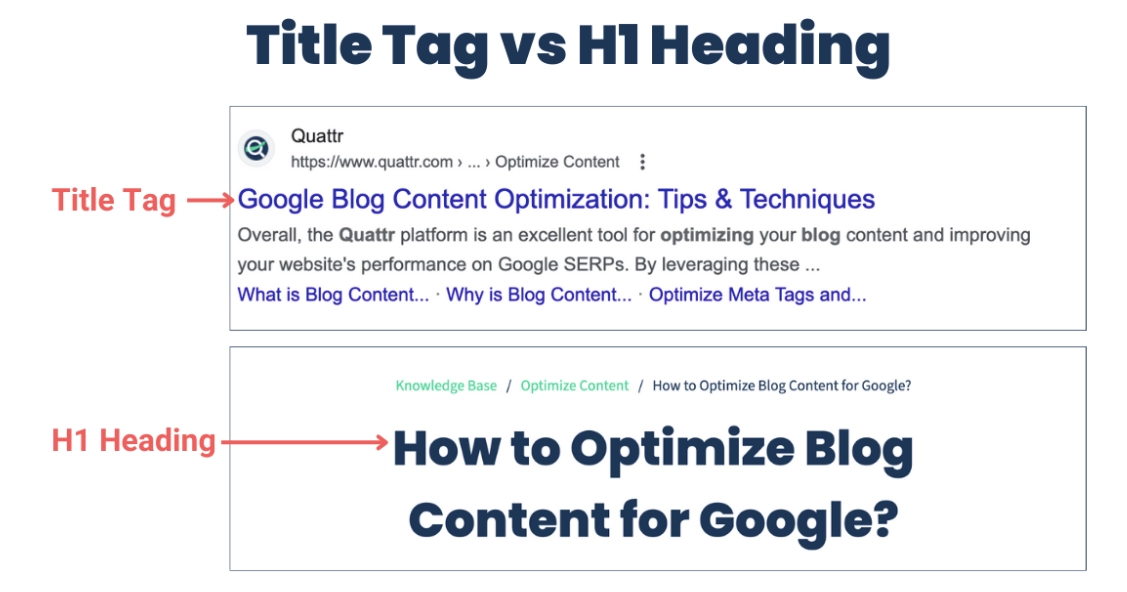
Many website owners confuse title tags and H1 tags.
Although both are important SEO elements, they serve different purposes.
Title Tag
The title tag appears in:
- Google search results
- Browser tabs
- Social media previews
Example:
“SEO Services for Small Businesses | DigiTotal”
H1 Tag
The H1 appears on the webpage itself.
Example:
“Grow Your Business With Professional SEO Services”
The title tag helps attract clicks.
The H1 helps visitors understand the page after they arrive.
A strong SEO strategy optimizes both separately.
How to Use H2 and H3 Tags for Better SEO
H2 and H3 headings provide depth and organization.
They help Google understand supporting topics and improve content coverage.
Example structure:
H1:
Complete Guide to Local SEO
H2:
What Is Local SEO?
H2:
Why Local SEO Matters in 2026
H3:
Benefits of Local SEO for Small Businesses
H3:
How Google Determines Local Rankings
H2:
Local SEO Strategies That Work
H3:
Google Business Profile Optimization
This structure creates topical authority and improves readability.
How Many H2 and H3 Tags Should You Use?
There is no fixed number of headings required.
The correct amount depends on content length and complexity.
A short service page may need:
- One H1
- Three to five H2 sections
A detailed guide may include:
- One H1
- Multiple H2 sections
- Supporting H3 sections
Every heading should add value. Avoid adding headings only for SEO purposes.
How Heading Tags Support Google AI Overviews in 2026
Search engines are becoming more focused on understanding meaning rather than matching individual keywords.
AI-powered search systems analyze:
- Content organization
- Topic relationships
- Question answers
- Expertise signals
To make content more AI-friendly:
- Use clear question-based headings
- Answer questions directly
- Organize information logically
- Cover related subtopics
- Demonstrate real experience
Example:
Instead of:
“Schema Markup”
Use:
“What Is Schema Markup and Why Does It Matter for SEO?”
This format aligns better with conversational searches.
Use Question-Based Headings for Featured Snippets
Google often displays direct answers through featured snippets.
Question-based headings increase opportunities to appear for informational searches.
Examples:
Instead of:
“Benefits of SEO”
Use:
“How Does SEO Help Small Businesses Grow Online?”
Instead of:
“Technical SEO”
Use:
“What Is Technical SEO and Why Is It Important?”
Common Heading Tag Mistakes to Avoid
Using Multiple H1 Tags Without Purpose
Multiple H1 tags can confuse content hierarchy on standard business websites.
Use one clear primary heading whenever possible.
Using Headings Only for Design
Do not use H2 or H3 simply because they make text larger.
Use CSS for styling.
Heading tags should represent content structure.
Keyword Stuffing Headings
Avoid unnatural keyword repetition.
Bad:
“SEO Agency SEO Services SEO Experts SEO Company”
Better:
“Professional SEO Services for Business Growth”
Creating Generic Headings
Weak:
“Services”
Better:
“SEO Services Designed to Increase Online Visibility”
Specific headings improve clarity.
Heading Optimization Checklist for 2026
Before publishing content, check:
✓ One clear H1 exists
✓ Main keyword appears naturally
✓ H2 sections cover important topics
✓ H3 sections explain supporting details
✓ Headings match user search intent
✓ Content is easy to scan
✓ Structure supports accessibility
✓ Questions are answered clearly
✓ Content provides genuine value
How DigiTotal Helps Businesses Improve SEO Performance
A strong heading structure is only one part of a successful SEO strategy.
At DigiTotal, we help businesses improve online visibility through:
- SEO audits
- Keyword research
- Content optimization
- Technical SEO
- On-page SEO
- Website optimization
- Internal linking strategies
Our approach focuses on creating websites and content that perform well across Google Search and modern AI-powered search platforms.
Frequently Asked Questions About Heading Tags and SEO
Are heading tags still important for SEO in 2026?
Yes. Heading tags remain important because they improve content structure, user experience, accessibility, and search engine understanding.
How many H1 tags should a webpage have?
Most business websites should use one clear H1 tag that explains the main topic of the page.
Should every heading contain keywords?
No. Keywords should be included naturally where relevant. Forced keyword usage can reduce readability.
Do H2 headings improve Google rankings?
H2 headings help Google understand content structure and supporting topics. They work together with other SEO factors to improve visibility.
Can headings help with Google AI Overviews?
Yes. Clear heading structures help AI systems understand content relationships and identify useful information.
Conclusion: Better Heading Structure Creates Better SEO Results
Heading tags are more than formatting tools. They create a foundation for content organization, user experience, accessibility, and search visibility.
In modern SEO, businesses need content that is easy for people to understand and easy for search engines to interpret.
A strategic heading structure helps Google understand your expertise, improves content readability, and increases your chances of appearing in traditional search results and AI-powered experiences.
If your website content is not ranking despite having valuable information, your content structure may need improvement.
Book a 15-minute introductory call with DigiTotal and let our SEO experts help you create a stronger foundation for long-term online growth.