

Plenty of businesses blog for months and see nothing: no traffic, no enquiries, no change in rankings. The usual cause isn’t effort. It’s that the posts weren’t built to answer anything people were searching for, or they didn’t connect to a service the business actually sells.
Blogging does work for SEO, but only when each post has a job. This guide explains what that job is, how to pick topics, how to write and structure posts that can rank, and how to avoid the mistakes that quietly drag a site down.
Book a 15-minute introductory call
Does Blogging Help SEO?
Yes. Blogging helps SEO because every post is a new page that can rank for a specific search query, attract relevant visitors, earn links and demonstrate your expertise. Posts also give you natural places to link to your service pages. Blogging only helps when posts are useful, match search intent and connect to your business goals. Publishing frequently without those things adds pages but not results.
How blogging supports SEO:
- Targets long-tail searches your service pages can’t cover
- Builds topical depth and shows expertise
- Passes relevance to service pages through internal links
- Earns mentions, shares and backlinks
- Gives search and AI systems clear answers to quote
- Keeps your site fresh through updates
Why Blogging Still Works for SEO
It captures searches your service pages can’t
A service page targets a commercial query such as “SEO services Sydney.” A blog can answer the questions people ask earlier in their decision, like “how long does SEO take” or “how to choose an SEO agency.” These searches are narrower, easier to rank for and often come from people who are close to deciding.
It builds topical depth
When you publish several well-linked posts around one subject, your site shows depth, not just a single page of claims. Google’s guidance on helpful, people-first content asks whether your content shows first-hand experience and real expertise on the topic. A set of connected posts is a practical way to show that.
It supports visibility in AI answers
Google says AI features such as AI Overviews draw on the same fundamentals as regular search: helpful, accessible, well-structured content (Google’s guidance on AI features). Clear definitions, direct answers and well-organised sections make your content easier to understand and quote. No one can guarantee inclusion in AI answers, but the formatting habits are all good practice.
It does a different job from a newsletter
A newsletter keeps existing customers informed. A blog should attract people who don’t know you yet. That’s why every post needs a target keyword, a clear audience and a next step.
Book a 15-minute introductory call
What Poor Blog Content Costs You
Thin or generic posts waste effort and weaken trust
Google’s spam policies target content produced mainly to manipulate rankings, including scaled content abuse, where many low-value pages are published with little original value. Whether it’s written by a person or by AI, filler content is a risk. At best it never ranks. At worst it drags down how the site is perceived overall.
Overlapping posts compete with each other
Keyword cannibalisation happens when several pages target the same query and intent. Google has to choose between them, and often ranks neither as well as a single strong page would. Fix it by merging, redirecting or clearly differentiating the pages.
Outdated posts mislead readers
A post with old advice, broken links or dead tools damages trust. Refreshing older posts usually pays off faster than writing new ones.
About crawl budget
You’ll often hear that filler blogs “waste crawl budget.” In practice, Google’s documentation says this mainly affects very large sites. For most small and mid-sized sites, the real issue is quality and structure, not crawl limits.
Step 1: Choose Topics That Connect to Your Services
Start with what you sell, then work outward.
- List your core services (for example, SEO, web design, Google Ads).
- Write down the questions customers ask before, during and after buying. Sales calls, emails and enquiry forms are the best source.
- Check demand with a keyword tool. See our keyword research guide for the full process.
- Look at what already ranks. If page one is full of how-to guides, write a how-to guide, not a sales page.
- Check Search Console. Queries where you rank on page two are quick candidates for a new supporting post or a content update.
Example for a plumber: A service page targets “emergency plumber Brisbane.” Supporting posts might answer “what to do when a pipe bursts,” “how much does a blocked drain cost” and “how to find your water shut-off valve.” Each post helps a different type of reader and links back to the service page.
Rule of thumb: If you can’t say which service a post supports, don’t write it yet.
Book a 15-minute introductory call
Step 2: Match Search Intent Before You Write
Intent is the reason behind a search. The four main types are informational (learn), commercial (compare), transactional (buy or enquire) and navigational (find a specific site). Most blog posts serve informational and commercial intent.
Search your keyword and study page one. Note the content type, the angle, the depth and the questions answered. Then ask what you can add that’s missing: a clearer explanation, local context, a template, real examples or more current information.
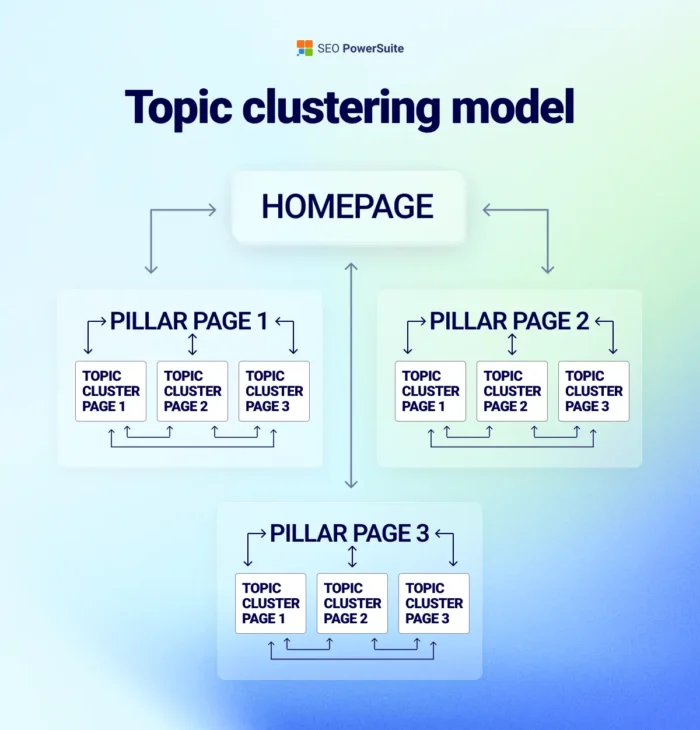
Step 3: Build Topic Clusters Instead of Random Posts

A topic cluster is one pillar page that covers a subject broadly, supported by cluster posts that cover subtopics in detail. All of them link to each other.
| Page type | Purpose | Example |
|---|---|---|
| Pillar page | Broad overview, ranks for the main topic | Brand strategy framework |
| Cluster post | Detailed answer to one subtopic | How to write a positioning statement |
| Service page | Commercial conversion point | Branding services |
Cluster posts should link up to the pillar, across to related posts and to the matching service page. See how this works in our guides on the brand strategy framework and keyword research.
Step 4: Write a Brief Before the Draft
A one-page brief keeps posts focused. Include:
- Primary keyword and two or three related terms
- Target reader and their problem
- Search intent and the content format that suits it
- The one question the post must answer clearly
- Outline of headings
- What you can add from real experience
- Internal links to include
- The call to action
Step 5: Structure the Post for Readers and Search Engines
A reliable structure:
- Title (H1): include the primary keyword and promise a clear benefit.
- Introduction: name the problem, say what the reader will learn, and answer the main question quickly.
- Quick answer box: a two or three sentence direct answer near the top.
- Body with H2 and H3 headings: one idea per section. Phrase some headings as the questions people ask.
- Lists, tables and examples: they make content easier to scan.
- FAQ section: short answers to related questions.
- Conclusion: summarise the takeaways and give a clear next step.
On length: write as long as it takes to fully answer the query, and no longer. Some topics need 600 words and others need 2,500. Google doesn’t set a word-count target, so compare yourself to the pages that already rank and make yours clearer, not just longer.
Book a 15-minute introductory call
Step 6: Write for People First, Then Optimise
Optimisation basics, applied after the draft reads well:
- Title tag: primary keyword near the front, kept short enough not to be cut off in results.
- URL: short and descriptive, such as /blogging-for-seo/.
- Headings: natural wording that reflects what each section covers.
- First paragraph: states the topic and the answer plainly.
- Images: original where possible, with descriptive file names and alt text. See our guide to optimising website images for SEO.
- Readability: short paragraphs, plain language, and definitions for any jargon.
Avoid repeating the keyword for its own sake. If a sentence sounds forced when read aloud, rewrite it.
Step 7: Add Experience, Evidence and Authorship
Competing pages often say the same generic things. What they can’t copy is your actual experience.
- Add first-hand detail: what you tested, what surprised you, what went wrong. [Insert a verified example, such as “When we updated 12 older posts for [client type], we saw X.”]
- Show real author credentials with a linked bio.
- Cite reliable sources and link to them.
- Use original screenshots, photos and data where you can.
- Be honest about limits. Saying what you don’t know builds trust.
Step 8: Use Internal Links With Purpose
Internal links tell readers and search engines how your content connects.
- Link each post to its related service page using descriptive anchor text.
- Link to two or three related posts, ideally in the cluster.
- Link back from older posts to new ones when relevant.
- Avoid generic anchors like “click here.”
- Check for orphan posts that have no internal links pointing to them.
For example, a post on keyword research can link to your SEO services, and a post on brand voice can link to your branding services.
Step 9: Add an FAQ Section That Answers Real Questions
Source FAQ questions from “People also ask” boxes, customer emails, sales calls and Search Console queries. Keep answers short (two to four sentences), direct and consistent with the body of the post. Don’t pad the list with questions nobody asks.
Book a 15-minute introductory call
Step 10: Promote and Measure
Publishing is the halfway point. After going live:
- Request indexing in Google Search Console if the post matters.
- Share it through email, social media and your team’s channels. Check how your link preview looks in Meta’s Sharing Debugger.
- Track impressions, clicks, average position and the queries each post earns.
- Track business outcomes: enquiries, calls and conversions from blog traffic, not just visits.
- Review after 8 to 12 weeks. Newer posts often take time to settle.
| Goal | Metric | Where to look |
|---|---|---|
| Visibility | Impressions, average position | Search Console |
| Traffic | Organic sessions to the post | Google Analytics |
| Engagement | Engaged time, scroll depth | Google Analytics |
| Conversion | Enquiries, calls, form fills from blog visits | Analytics and CRM |
Step 11: Refresh Existing Posts
Updating is often a better use of time than publishing something new.
- Find posts with falling clicks or stuck on page two.
- Check that the intent still matches page one.
- Update facts, screenshots, tools and links.
- Add missing sections, examples and FAQs.
- Merge overlapping posts and redirect the weaker URL.
- Change the “last updated” date only when real changes were made.
Common Blogging Mistakes to Avoid
- Writing about topics unrelated to any service
- Publishing on a schedule without a keyword or intent
- Creating several posts for the same query
- Copying competitors’ outlines with no new insight
- Publishing AI-generated drafts without expert review or edits
- Forgetting a call to action
- Never updating older posts
- Judging success by traffic alone, not enquiries
How to Show E-E-A-T in Your Blog
Google’s quality guidance looks for experience, expertise, authoritativeness and trust. In practice:
- Experience: real examples, screenshots and lessons from your own work
- Expertise: accurate, well-organised explanations by a named author
- Authoritativeness: mentions and links from credible sites, plus consistent coverage of your topic
- Trust: clear contact details, honest claims, cited sources and up-to-date content
For a general overview, see Wikipedia’s page on E-E-A-T. For Australian readers, the ACCC’s guidance on advertising and selling is a useful reference for keeping claims and testimonials accurate and not misleading.
Book a 15-minute introductory call
Frequently Asked Questions
Does blogging help SEO?
Yes, when posts are useful, match search intent and link to your key pages. Blogs let you rank for more queries, show your expertise and support your service pages.
How often should I blog for SEO?
Consistency matters more than volume. One strong, well-researched post a fortnight beats four thin posts a week. Choose a pace you can sustain without lowering quality.
How long should a blog post be for SEO?
There’s no ideal length. Write enough to fully answer the question. Review the top results for your keyword to judge how much depth searchers expect.
What is a good blog structure for SEO?
Use a clear title, an introduction that answers the main question quickly, descriptive H2 and H3 headings, short paragraphs, lists or tables where helpful, an FAQ and a conclusion with a next step.
What are topic clusters?
A topic cluster is a main pillar page on a broad subject supported by detailed posts on related subtopics, all linked together. It helps readers navigate and shows depth of expertise.
What is keyword cannibalisation?
It’s when multiple pages on your site target the same keyword and intent, so they compete with each other. Fix it by merging pages, redirecting duplicates or differentiating their focus.
Can AI-written blog posts rank on Google?
Google says it rewards helpful content however it’s produced, but it penalises content made mainly to manipulate rankings. If you use AI, add real expertise, check facts and edit thoroughly.
How long does it take for a blog post to rank?
It varies with competition, your site’s authority and the keyword. Some posts gain traction within weeks and others take several months. Review performance after two to three months.
How do I get my blog featured in AI Overviews?
There’s no guaranteed method. Give clear, accurate answers, structure content with descriptive headings, cite sources, demonstrate experience and make sure pages can be crawled and indexed.
Should I update old blog posts?
Yes. Refreshing outdated posts with new information, better examples and cleaner structure often improves performance faster than writing new content.
Conclusion: Key Takeaways
Blogging for SEO works when every post serves a purpose. Choose topics tied to your services, match the intent behind each search, group posts into clusters, write with real experience, link internally with care, and measure what matters to the business. Then keep updating what you’ve published.
Want a blog strategy that supports your sales? Book a free 15-minute introductory call with DigiTotal and we’ll help you find your best content opportunities.