
How Long Does It Take for a New Website to Rank on Google?
Honest answer: indexing can take days to a few weeks, but meaningful rankings typically take three to six months, and longer for competitive terms like “SEO services” or “personal injury lawyer.”
Google doesn’t publish a fixed timeline. What speeds things up is not tricks but removing friction. A site that’s easy to crawl, clearly organised and full of useful pages gets discovered and understood sooner. Think of the first few months as building a case for your site, not waiting in a queue.
What “fast” realistically looks like:
| Stage | Typical timeframe | What to expect |
|---|---|---|
| Indexing | Days to a few weeks | Core pages appear in Google |
| First rankings | 4 to 12 weeks | Long-tail and brand searches |
| Steady traffic | 3 to 6 months | Growing impressions and clicks |
| Competitive terms | 6 to 12+ months | Needs links, authority and consistency |
Book a 15-minute introductory call
Step 1: Get the Launch Basics Right
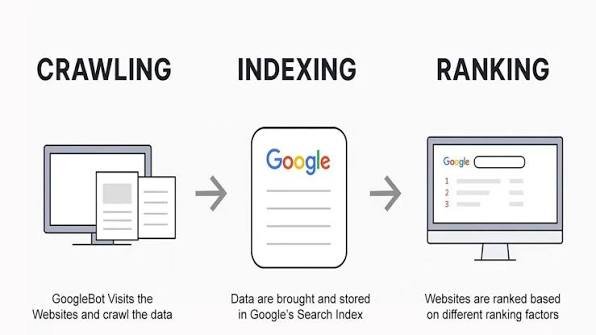
Most “my site isn’t ranking” problems trace back to something blocking Google on day one. Check these before anything else.
Make sure the site is actually indexable
- Remove any “Discourage search engines from indexing this site” setting (common in WordPress during development).
- Check your robots.txt file isn’t blocking important pages.
- Confirm key pages don’t carry a noindex tag.
Set up Google Search Console
Google Search Console is free and tells you directly how Google sees your site. After verifying ownership (via DNS record, HTML file or tag), you can:
- Submit your XML sitemap under Indexing → Sitemaps
- Use URL Inspection to request indexing of your most important pages
- Monitor impressions, clicks, average position and indexing errors
- Get alerts about security issues and manual actions
Submit a sitemap
A sitemap is a file listing the pages you want Google to find. It helps discovery, though it doesn’t guarantee indexing. Most CMS platforms generate one automatically. Reference it in robots.txt (Sitemap: https://yourdomain.com/sitemap.xml) and submit it in Search Console. Google’s sitemap guide explains the format.
Claim your local presence
If you serve a local area, set up a Google Business Profile straight away. For Brisbane and Queensland businesses, this often produces visibility sooner than organic rankings.
Step 2: Build a Site Architecture Google Can Understand
Site architecture is how your pages are grouped and linked. A clear structure helps visitors find things and helps Google work out which pages matter most.
Keep it shallow and logical
Aim for every important page to be reachable within three clicks of the homepage. A typical service business structure looks like this:
Home
├── Services
│ ├── Service A
│ └── Service B
├── About / Team
├── Blog
│ └── Articles grouped by topic
└── Contact
Use internal links with purpose
- Link from blog posts to the relevant service page using descriptive anchor text (for example, “our SEO services” rather than “click here”).
- Link related articles to each other so topics form clusters.
- Make sure no important page is an “orphan” with no links pointing to it.
Add breadcrumbs
Breadcrumbs show visitors where they are (Home › Blog › This article) and reinforce your hierarchy for search engines. With BreadcrumbList structured data, they can also appear in search results.
Write unique titles and descriptions for every page
- Title tags are a ranking signal. Keep them clear, lead with the main topic, and aim for roughly 50 to 60 characters.
- Meta descriptions don’t directly influence rankings, but a good one can lift click-through rate. Write them as a short pitch, around 150 to 160 characters.
Book a 15-minute introductory call
Step 3: Choose Keywords a New Site Can Realistically Win
Targeting the most popular search terms is the most common mistake new sites make. You’re competing against domains with years of authority, so start where you can win.
Prioritise search intent over volume
Every search has an intent:
- Informational: “how to rank a new website”
- Commercial: “best SEO agency Brisbane”
- Transactional: “SEO quote Brisbane”
- Navigational: a specific brand or site
Look at what Google already shows for your target phrase. If the top results are all service pages, a blog post won’t rank, and vice versa.
Go long-tail first
Longer, more specific phrases have lower competition and usually higher conversion intent. Compare:
| Broad (hard) | Specific (achievable) |
|---|---|
| plumber | emergency plumber Indooroopilly |
| SEO | SEO for new e-commerce stores Australia |
| website speed | how to improve LCP on WordPress |
A simple process
- List the problems your customers actually have and the questions they ask you on calls.
- Expand ideas using Google Keyword Planner, Google’s autocomplete and the “People also ask” box.
- Check the live results to judge difficulty and intent.
- Map one primary keyword to one page to avoid pages competing against each other.
- Use keywords naturally in the title, H1, opening paragraph, a few subheadings and image alt text. If it reads awkwardly aloud, rewrite it.
Step 4: Publish Content That Demonstrates E-E-A-T
Google’s systems aim to surface helpful, reliable content created for people rather than for search engines. Its quality guidelines describe this through E-E-A-T:
- Experience: first-hand, real-world involvement with the topic
- Expertise: demonstrable knowledge or qualifications
- Authoritativeness: recognition from others in your field
- Trustworthiness: accuracy, transparency and safety. Google describes trust as the most important of the four.
Google’s guidance on creating helpful, reliable content is worth reading in full.
How to show E-E-A-T on a brand-new site
- Put real people on the site. Add an About page, team bios with relevant credentials, and named authors on articles.
- Show first-hand experience. Include your own case studies, screenshots, results, photos of real projects and lessons learned. Generic advice that could appear on any site is what you want to avoid.
- Be transparent. Display your business name, ABN, address, phone number, privacy policy and clear contact options.
- Cite credible sources. Link to official documentation and recognised research where it backs a claim.
- Keep content accurate and dated. Show “last updated” dates and revise pages when things change.
- Collect genuine reviews. Never fake or incentivise dishonest reviews. The ACCC takes misleading online claims seriously.
Write for the reader first
- Open with the answer, then explain.
- Use short paragraphs, descriptive subheadings, lists and tables.
- Include specific examples, steps and numbers rather than vague statements.
- Cover the topic thoroughly, but cut padding. Length is not a ranking factor, and usefulness is.
- Publish consistently. A site with a handful of excellent, interlinked pages beats one with fifty thin ones.
Avoid scaled, low-value content
Google’s spam policies target mass-produced pages made mainly to manipulate rankings, including unedited AI output. AI can assist your drafting, but a knowledgeable human should add experience, verify facts and own the final piece.
Book a 15-minute introductory call
Step 5: Fix Speed, Mobile Experience and Crawlability
Google uses the mobile version of your site for indexing and ranking, so your phone experience is your SEO experience. See Google’s mobile-first indexing guidance.
Pass Core Web Vitals
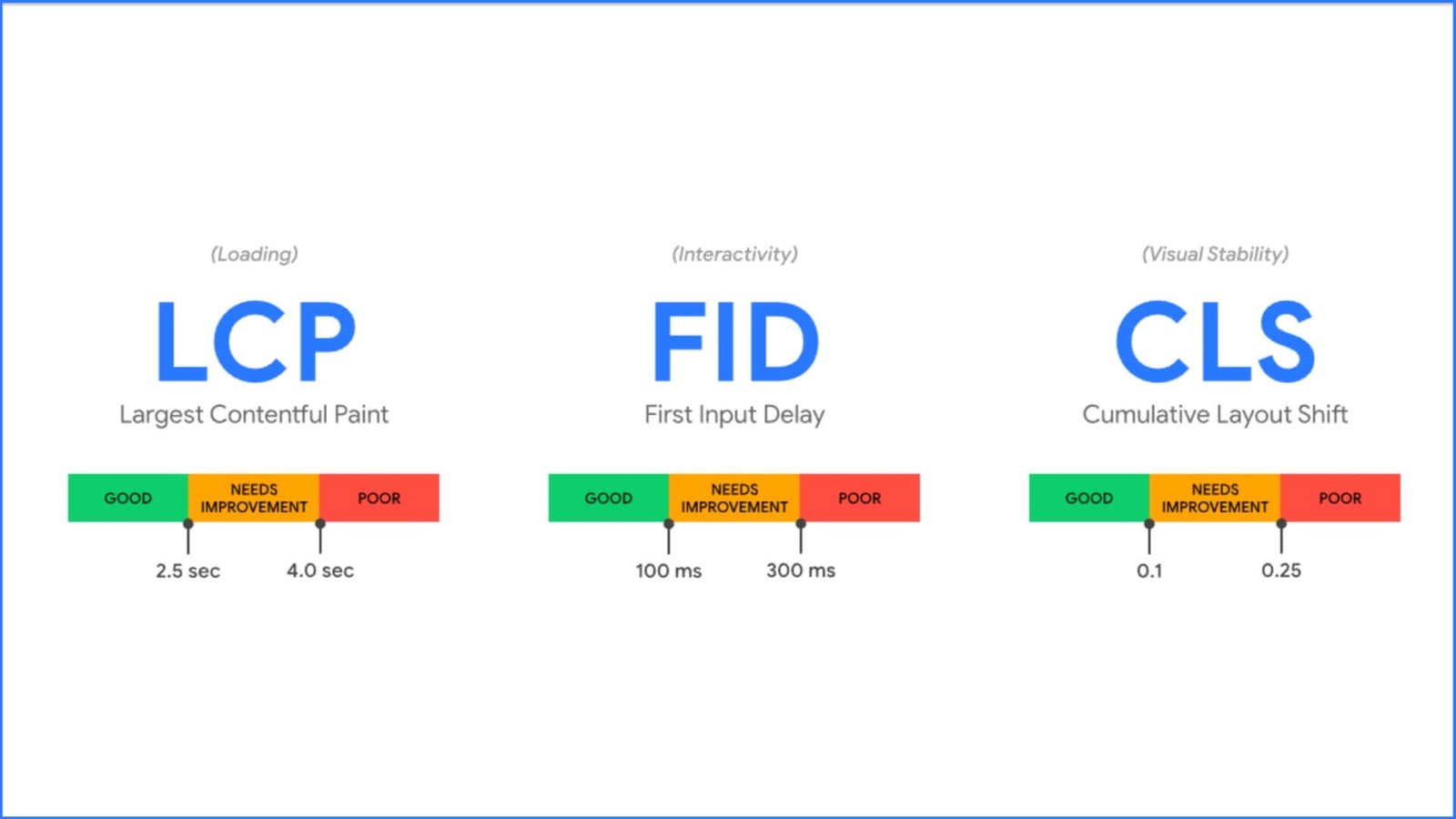
Core Web Vitals measure real-world user experience. The three current metrics are:
| Metric | Measures | Good target |
|---|---|---|
| LCP (Largest Contentful Paint) | Loading speed of the main content | 2.5 seconds or less |
| INP (Interaction to Next Paint) | Responsiveness to taps and clicks | 200 ms or less |
| CLS (Cumulative Layout Shift) | Visual stability | 0.1 or less |
Test your pages with PageSpeed Insights and check the field data in Search Console’s Core Web Vitals report.
Common quick wins:
- Compress images and serve modern formats such as WebP or AVIF
- Lazy-load images below the fold, but never your main hero image
- Use quality hosting and a CDN
- Remove unused plugins, scripts and tracking tags
- Set width and height on images to prevent layout shifts
- Enable caching and minify CSS and JavaScript
Make it genuinely mobile-friendly
- Use responsive design with one URL for all devices, not a separate m-dot site.
- Include the viewport tag: <meta name=”viewport” content=”width=device-width, initial-scale=1″>
- Use readable font sizes and tap targets large enough for thumbs.
- Check that content and structured data are the same on mobile and desktop.
A note on crawl budget
Crawl budget is a concern mainly for very large sites (Google points to sites with hundreds of thousands of pages). A new small site rarely needs to worry. Focus instead on fixing server errors, redirect chains and broken links. See Google’s crawl budget guide if you run a large store.
Use HTTPS
Serve every page over HTTPS. It’s a baseline trust signal for users and a lightweight ranking signal.
Step 6: Choose Your Domain and URLs Wisely
Domain name
- Pick something short, memorable and easy to spell and say aloud.
- A keyword in the domain is fine if it suits the brand, but an exact-match keyword domain gives no real ranking boost on its own.
- For Australian audiences, a .com.au domain signals local relevance (it requires an Australian presence and ABN or equivalent eligibility).
- Avoid buying a previously penalised or spammy domain.
One domain, one site
Keep your main content on a single domain. Splitting content across multiple domains spreads your authority thin. If you must use subdomains (for example, a store or a separate app), understand that Google may treat them as separate from your main site for some purposes, so keep your core SEO content in subfolders such as /blog/.
Clean URLs
- Keep them readable and descriptive: /seo-services/ beats /category/1234.
- Use hyphens, not underscores.
- Use lowercase and avoid unnecessary parameters.
- Short URLs are easier to share, though length itself is not penalised.
- Set your URLs before launch. Changing them later means redirects, and migrations carry risk.
Book a 15-minute introductory call
Step 7: Earn Backlinks and Local Signals the Right Way
Backlinks, which are links from other websites to yours, remain one of the strongest ways Google gauges credibility. One link from a respected, relevant site can outweigh dozens from low-quality directories.
Link-building tactics that work for new sites
- Create link-worthy assets: original data, free tools, templates, checklists or well-designed guides that others want to cite.
- Local partnerships: suppliers, chambers of commerce, sponsorships, local news and community events in Brisbane or your region.
- Digital PR: share a genuinely newsworthy angle or expert commentary with journalists.
- Guest contributions: write real, expert content for respected industry publications, not link farms.
- Business listings: consistent name, address and phone details on legitimate directories and your Google Business Profile.
- Social presence: a Facebook Business Page won’t boost rankings directly, but it builds brand visibility, supports branded searches and gives people another route to your site.
What not to do
Buying links, joining link exchange schemes or using automated link networks violates Google’s spam policies and can lead to ranking drops or manual actions. If a link offer sounds too easy, it’s usually a risk.
External linking from your own site
Linking out to authoritative sources isn’t “leaking authority.” It helps readers and demonstrates your content is well researched. Link to relevant, trustworthy pages, and don’t worry about it passing or losing rankings.
Step 8: Prepare for AI Overviews and AI Search
More searches now end in AI-generated summaries, and chat tools such as ChatGPT, Claude, Gemini and Perplexity increasingly cite web sources. Google states that its AI features in Search draw on the same foundations as regular SEO. There’s no special markup that guarantees inclusion.
What consistently helps:
- Answer questions directly. Place a clear, concise answer (40 to 60 words) near the top of the relevant section, then expand.
- Structure content for extraction. Use descriptive headings, short paragraphs, numbered steps, bullet lists and simple tables.
- Build entity clarity. Be consistent with your brand name, address, services and author names across your site, Google Business Profile and social profiles, so systems can confidently identify who you are.
- Add structured data. Use Article, FAQ, Organization and BreadcrumbList schema that matches visible page content, and validate it with the Rich Results Test.
- Show originality. AI systems tend to surface sources that add something new: your own data, case studies and expert opinion.
- Keep pages crawlable and fast. Content hidden behind heavy JavaScript or blocked from bots can’t be cited.
- Stay accurate and current. Update statistics and remove outdated claims.
Book a 15-minute introductory call
Your 90-Day Action Plan
Days 1 to 14: Foundations
- Remove indexing blocks, enable HTTPS, verify Search Console
- Submit sitemap, request indexing for key pages
- Set up Google Business Profile
- Finalise site structure, URLs, titles and meta descriptions
Days 15 to 45: Content and technical polish
- Complete keyword research and map keywords to pages
- Publish core service pages, About page and 3 to 5 helpful articles
- Fix Core Web Vitals issues on mobile
- Add schema markup and internal links
Days 46 to 90: Authority and refinement
- Launch outreach, local partnerships and citations
- Collect genuine customer reviews
- Review Search Console queries and improve pages with high impressions but low clicks
- Publish supporting content around your best-performing topics
Common Mistakes That Slow New Websites Down
- Leaving the site set to “noindex” after launch
- Targeting keywords far beyond the site’s authority
- Publishing thin, copied or unedited AI content
- Ignoring mobile performance
- Having no clear author, business details or contact information
- Buying cheap backlink packages
- Expecting results in two weeks and changing strategy constantly
- Never checking Search Console
Frequently Asked Questions
How long does it take for a new website to rank on Google?
Indexing can happen within days to weeks, but meaningful rankings usually take three to six months. Competitive keywords can take a year or more. Speed depends on competition, content quality, technical health and backlinks.
How can I get my new website indexed faster?
Verify your site in Google Search Console, submit an XML sitemap, use URL Inspection to request indexing for key pages, and link to new pages from existing ones. Make sure nothing is blocking crawlers.
Is it possible to rank a new website without backlinks?
Yes, for low-competition, long-tail and local searches. For competitive terms, quality backlinks are usually necessary because they signal credibility.
Do I need a blog to rank a new website?
Not always, but a blog helps you target informational searches, demonstrate expertise and attract links. Service and location pages typically carry the commercial intent.
Does domain age matter for SEO?
Domain age isn’t a direct ranking factor Google relies on. Older domains often rank better because they’ve had time to build content and links, not because of age itself.
Does page speed affect Google rankings?
Yes. Core Web Vitals are part of Google’s page experience signals. Great speed alone won’t outrank better content, but poor speed can hold a site back and hurts conversions.
Can AI-generated content rank on Google?
Google doesn’t penalise content simply for being AI-assisted, but it does demote low-quality, mass-produced content created to manipulate rankings. Add human expertise, original insight and fact-checking.
How do I appear in Google AI Overviews and AI chat answers?
Follow strong SEO fundamentals: helpful, accurate, well-structured content with clear answers, schema markup, consistent brand information and good technical health. No special tag guarantees inclusion.
Should I hire an SEO agency for a new website?
It’s worthwhile if you lack time or technical know-how, or if you’re in a competitive market. A good agency will set realistic timelines, explain what it’s doing and report on measurable outcomes.
Conclusion: Start Early, Stay Consistent
Ranking a new website quickly is less about shortcuts and more about removing obstacles and stacking credible signals. Get indexed properly, structure the site clearly, choose winnable keywords, publish content that shows real experience, keep the site fast on mobile, and earn links honestly. Do those things well and you give Google every reason to trust you sooner.
Key takeaways:
- Expect 3 to 6 months for meaningful traction, with early wins on long-tail and local searches.
- Technical basics and clear structure come first.
- E-E-A-T is demonstrated through real people, real experience and transparent business details.
- Quality backlinks and local signals accelerate rankings.
- Structured, direct, original content gives you the best chance of being cited in AI Overviews and AI tools.
Ready to get your new site ranking?
DigiTotal is a Brisbane-based SEO agency helping new and growing businesses build visibility that lasts. Book a 15-minute introductory call and we’ll review your site and map out your first 90 days. Prefer to explore first? See our SEO services.