

You can publish a brilliant page and still have Google take weeks to find it, or never find it at all. An XML sitemap is one of the simplest ways to prevent that. It’s a file that lists the URLs you want search engines to know about, so crawlers don’t have to discover them only by following links.
This guide explains what a sitemap is, who needs one, how to build and submit it step by step, and the errors we most often find when auditing client sites.
Book a 15-minute introductory call
What Does an XML Sitemap Do for Your Website?
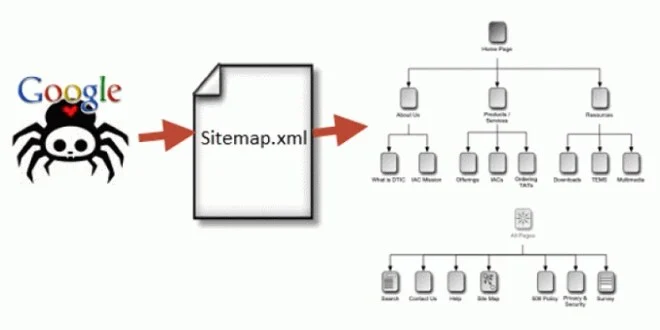
Think of your site as a city and the sitemap as a directory of addresses. Crawlers can still find buildings by walking the streets (following internal links), but a directory gets them to new and hard-to-reach locations faster.
A sitemap helps in four practical ways:
- Faster discovery of new pages. Useful for blogs, product launches, and news.
- Coverage of orphan pages. Pages with no internal links are hard for crawlers to find. A sitemap gives them a way in, although fixing the internal linking is the better long-term answer.
- Better signals on freshness. An accurate lastmod date tells Google which pages changed, so it can prioritise recrawling them. See Google’s note on sitemap lastmod and ping changes.
- Diagnostics. The sitemap report in Google Search Console shows how many submitted URLs were discovered, and which had problems.
What a sitemap doesn’t do: it doesn’t force indexing, doesn’t boost rankings directly, and doesn’t define your site’s hierarchy. Your URL structure and internal links do that.
Do You Actually Need an XML Sitemap?

Google’s own guidance says you may not need one if your site is small (roughly 500 pages or fewer) and every page is reachable through internal links. In practice, we still recommend one for almost every business site, because it costs little and gives you Search Console reporting.
You definitely benefit from one if:
| Situation | Why a sitemap helps |
|---|---|
| Large site (thousands of URLs) | Helps crawlers reach deep pages |
| New site with few external links | Few backlinks means slower discovery |
| E-commerce with frequent product changes | Signals updated and new URLs |
| Lots of media (video, images) or news content | Media-specific sitemap extensions exist |
| Weak internal linking or isolated pages | Provides a fallback path |
| Multi-language or multi-region site | Sitemaps can carry hreflang annotations |
XML Sitemap vs HTML Sitemap: What’s the Difference?
| XML sitemap | HTML sitemap | |
|---|---|---|
| Audience | Search engines | Human visitors |
| Format | Machine-readable XML | A normal web page with links |
| Location | /sitemap.xml (typical) | e.g. /sitemap/ |
| Main benefit | Crawl and discovery | Navigation and usability |
| Required? | Recommended | Optional |
Many sites have both. The XML version serves crawlers and the HTML version helps visitors find their way, and also adds internal links.
What Does an XML Sitemap Look Like?
A minimal example:
xml
<?xml version=“1.0” encoding=“UTF-8”?>
<urlset xmlns=“http://www.sitemaps.org/schemas/sitemap/0.9”>
<url>
<loc>https://www.example.com/</loc>
<lastmod>2026-03-14</lastmod>
</url>
<url>
<loc>https://www.example.com/services/seo/</loc>
<lastmod>2026-02-27</lastmod>
</url>
</urlset>
- <loc> is the full, canonical URL (required).
- <lastmod> is the date the page’s content last meaningfully changed. Use it only if it’s accurate.
- <priority> and <changefreq> are optional in the protocol, but Google ignores them, so you can leave them out.
Book a 15-minute introductory call
How to Create an XML Sitemap: 6 Steps
1. Decide which URLs belong in it
Include only pages you want indexed: canonical, indexable URLs that return a 200 status. Leave out redirects, 404s, noindex pages, duplicates, internal search results, and parameter URLs.
2. Choose how to generate it
- WordPress: core WordPress creates a basic sitemap at /wp-sitemap.xml (WordPress 5.5 announcement). SEO plugins such as Yoast, Rank Math, and AIOSEO generate more configurable ones, typically at /sitemap_index.xml. Use one source only, and disable the others to avoid duplicates.
- Shopify, Wix, Squarespace: a sitemap is generated automatically, usually at /sitemap.xml.
- Custom or large sites: generate it programmatically from your database, so it updates as content changes.
- Small static sites: a crawler such as Screaming Frog can export one, or you can write it by hand.
3. Add lastmod honestly
Update it only when the page’s content actually changes. If every URL shows today’s date, Google learns to ignore the field.
4. Validate the file
Check that the XML is well-formed, URLs are absolute (full https:// addresses), and special characters are escaped. Search Console will also flag parsing errors after submission.
5. Publish it at the root
Upload it to a location such as https://www.example.com/sitemap.xml. A sitemap can only list URLs on its own host and path scope, so keep it at the root.
6. Reference it in robots.txt
Add this line to your robots.txt file:
Sitemap: https://www.example.com/sitemap.xml
Use the full URL. This lets any crawler find your sitemap, not just Google.
How to Submit Your Sitemap to Google Search Console
- Sign in to Google Search Console and select your property.
- In the left menu, go to Indexing > Sitemaps.
- Under “Add a new sitemap,” enter the sitemap path (e.g. sitemap.xml).
- Click Submit.
- Check the status. Success means Google fetched and parsed it. Has errors or Couldn’t fetch means you need to fix something. See Google’s help page on the Sitemaps report.
A few notes:
- You only need to submit once. Google rechecks it periodically.
- Google retired the old sitemap “ping” endpoint, so resubmitting doesn’t help. Keep lastmod accurate instead.
- Bing: submit through Bing Webmaster Tools. Bing and other participating engines also support IndexNow, a protocol for pushing instant URL change notifications. Google doesn’t use it.
Sitemap Limits and Sitemap Index Files
Each sitemap file can contain up to 50,000 URLs or 50 MB uncompressed, whichever comes first. Larger sites split their URLs across several files and list them in a sitemap index:
xml
<?xml version=“1.0” encoding=“UTF-8”?>
<sitemapindex xmlns=“http://www.sitemaps.org/schemas/sitemap/0.9”>
<sitemap><loc>https://www.example.com/sitemap-pages.xml</loc></sitemap>
<sitemap><loc>https://www.example.com/sitemap-products.xml</loc></sitemap>
<sitemap><loc>https://www.example.com/sitemap-blog.xml</loc></sitemap>
</sitemapindex>
Splitting by content type (pages, products, blog) makes Search Console reporting much easier to interpret. Google’s guide to managing large sitemaps covers the details.
Specialised sitemaps: Google supports extensions for images, video, news, and localised versions of pages (hreflang).
Book a 15-minute introductory call
XML Sitemap Best Practices for 2026
- List only indexable, canonical, 200-status URLs. A sitemap is a statement of “these are my important pages.”
- Keep it consistent with your other signals. Don’t list URLs that are blocked in robots.txt or tagged noindex.
- Use accurate lastmod values and skip priority and changefreq.
- Automate updates so new content appears without manual edits.
- Use sitemap indexes for large sites, split by content type.
- Monitor the report regularly. Compare “submitted” and “indexed” counts in Search Console.
- Fix the cause, not the symptom. If valuable pages show as “Discovered, currently not indexed,” look at content quality and internal links, not just the sitemap.
8 Common Sitemap Mistakes (and Fixes)
- Including redirected, 404, or non-canonical URLs. Regenerate the file from live, canonical pages only.
- Listing noindex or robots-blocked URLs. This sends contradictory signals.
- Fake lastmod dates. Update only on real content changes.
- Wrong protocol or host. http vs https or www vs non-www mismatches cause errors.
- Multiple competing sitemaps. Running core WordPress, a plugin, and a theme generator at once creates duplicates.
- Exceeding the size limits. Split into a sitemap index.
- Submitting once and never checking. Review the report monthly, and after every migration.
- Treating the sitemap as a substitute for internal links. Link important pages from relevant content too.
Conclusion: Key Takeaways
- An XML sitemap helps search engines discover your URLs. It doesn’t guarantee indexing or boost rankings.
- Include only canonical, indexable, 200-status pages, and keep lastmod accurate.
- Generate it automatically, reference it in robots.txt, and submit it under Indexing > Sitemaps in Search Console.
- Stay under 50,000 URLs / 50 MB per file, and use a sitemap index beyond that.
- Check the report regularly. It’s one of the quickest ways to spot indexing problems.
Want a specialist to check your sitemap, indexing, and crawl setup? Book a 15-minute introductory call with the DigiTotal team and we’ll tell you what’s working and what needs fixing.
FAQs
What is an XML sitemap?
It’s a file listing the important URLs on your website so search engines can find and crawl them more efficiently. It usually lives at /sitemap.xml.
Do I need a sitemap for SEO?
Not strictly. Small, well-linked sites can be crawled without one. But a sitemap speeds up discovery and gives you indexing data in Search Console, so we recommend one for most sites.
Does a sitemap improve rankings?
Not directly. It helps Google discover and recrawl pages, and a page must be crawled and indexed before it can rank.
How do I submit a sitemap to Google?
In Google Search Console, go to Indexing > Sitemaps, enter your sitemap URL, and click Submit. Also add a Sitemap: line to robots.txt.
What is the difference between an XML sitemap and an HTML sitemap?
An XML sitemap is written for search engines. An HTML sitemap is a visible page that helps people navigate your site.
How many URLs can a sitemap contain?
Up to 50,000 URLs or 50 MB uncompressed per file. Use a sitemap index to combine multiple files.
Does Google use priority and changefreq in sitemaps?
No. Google ignores both. It does use lastmod when the dates are consistently accurate.
How do I update my sitemap automatically?
Use a CMS or SEO plugin that regenerates it whenever content changes, or generate it dynamically from your database. WordPress creates one by default.
Why are my sitemap URLs not indexed?
Common causes include low-quality or duplicate content, noindex tags, redirects, weak internal linking, and crawl issues. Check the Page indexing report in Search Console for the specific reason.
Where do I find my sitemap?
Try yourdomain.com/sitemap.xml, /sitemap_index.xml, or /wp-sitemap.xml, or look for the Sitemap: line in your robots.txt file.