
A rebrand usually gets planned in a design studio and tested on a mood board. Search engines never see any of that. They see URLs that have changed, a business name that no longer matches old listings, and backlinks pointing at pages that no longer exist. If nobody manages those details, the new brand can launch to a site that has lost much of its search visibility.
This guide shows you how to run a rebrand so your brand, SEO and advertising change together. It covers what to do before launch, on launch day and in the months after, with a checklist you can hand to your web developer and marketing team.
Book a 15-minute introductory call
How Do You Rebrand Without Hurting SEO?
To rebrand without losing SEO, plan the change before launch, benchmark current performance, map every old URL to a new one with 301 redirects, and keep your content and on-page SEO intact. Then update your sitemap, structured data, Google Business Profile, directory listings, backlinks and ad campaigns so your name and details match everywhere. Monitor rankings and traffic for several months afterwards.
Why Rebranding Puts SEO at Risk
Your search rankings are built from many small signals: page content, links from other sites, history, and consistent business information. A rebrand can disturb every one of them at once.
- URLs change. If old URLs stop working without redirects, the ranking history and backlinks attached to them are lost.
- Content changes. Rewritten pages may drop the keywords and answers that earned traffic in the first place.
- Name mismatches. If your website says one name and your listings say another, search engines and customers can’t be sure they belong to the same business.
- Tracking breaks. New pages without analytics, tags and conversion tracking leave you blind to what’s happening.
- Ads point to dead pages. Campaigns waste budget sending people to errors or outdated messaging.
Some movement in rankings after a major change is normal. Google’s own guidance on site moves explains that fluctuations can occur while its systems process the changes, and that how long it takes depends on the size of the site (Google: Site moves with URL changes). Careful preparation shortens that period and reduces the dip.
What Is Actually Changing? Know Your Rebrand Type First
The level of SEO risk depends on what changes. Work out which of these applies to you.
| Type of change | SEO risk | What to watch |
|---|---|---|
| Visual refresh only (logo, colours, fonts) | Low | Image file names, alt text, page speed, social images |
| Name change, same domain | Medium | Title tags, schema, listings, directories, brand mentions, branded searches |
| Website redesign with new URLs | Medium to high | Redirects, internal links, content parity, tracking |
| New domain name | High | Full site move: redirects, Change of Address, backlinks, listings |
| Merger or repositioning with new services | High | Content strategy, keyword targeting, page consolidation |
A practical tip: where possible, don’t change everything at once. Launching the new name and visuals first and migrating the domain later (or the reverse) makes problems easier to trace and fix.
For help with the strategy that should come before any of this, see our guide to building a brand strategy framework.
Book a 15-minute introductory call
Step 1: Benchmark Before You Change Anything
You can’t judge the impact of a rebrand if you don’t know where you started. Before launch, record:
- Organic traffic and conversions from Google Analytics
- Rankings, clicks and impressions for your top queries and pages from Google Search Console
- A full crawl of the current site (all URLs, titles, headings, status codes) using a crawler such as Screaming Frog
- Your top backlinks and referring domains from a tool like Ahrefs or Semrush
- Your most valuable pages, ranked by traffic, links and enquiries
- Current Google Business Profile, directory and social profile details
- Branded and non-branded search traffic, tracked separately
Save these exports somewhere safe. They’re your reference point for the next six months.
Step 2: Protect Your Best-Performing Content
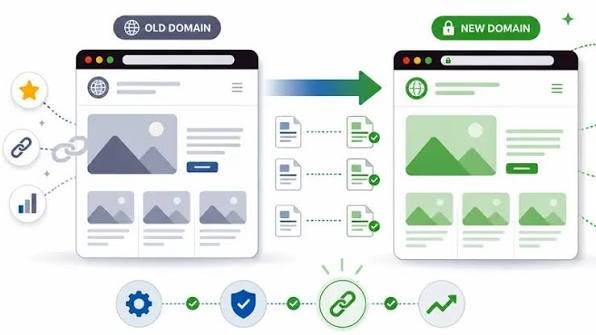
Rebrands often include a content rewrite. Before anything is rewritten:
- Flag the pages that earn the most traffic, links and enquiries. Treat them carefully.
- Keep the topics, headings and answers that are working. Update tone and branding without removing useful content.
- Avoid merging or deleting pages unless you have a redirect plan for each one.
- Keep your target keywords in mind. A new brand voice should not push your pages away from the searches that bring you customers. Our keyword research guide explains how to check this.
Step 3: Build and Test on a Staging Site
Build the new site in a private environment first.
- Block staging from search engines using a password or noindex while you test. Google can accidentally index staging sites, which creates duplicate content.
- Remove the block at launch. One of the most common launch mistakes is a noindex tag or robots.txt block carried over from staging to the live site. Check this on launch day.
- Check that every important page exists in the new version, with equal or better content.
- Test tracking, forms, redirects, mobile layouts and page speed before going live.
Book a 15-minute introductory call
Step 4: Set Up 301 Redirects (The Most Important Step)
A 301 redirect tells browsers and search engines that a page has moved permanently. It carries visitors and ranking signals from the old URL to the new one. See Google’s redirect documentation for how they work.
Rules that matter:
- Map every old URL to its closest new equivalent. A one-to-one mapping beats sending everything to the homepage.
- Use permanent (301) redirects, not temporary ones, for permanent moves.
- Avoid redirect chains. Old URL to new URL in one hop, not three.
- Redirect images and PDFs if their addresses change and they earn traffic.
- Test every redirect after launch with your crawler.
- Keep redirects live for at least a year, as Google recommends for site moves, and longer for pages that still earn links.
Simple redirect map template:
| Old URL | New URL | Status | Tested |
|---|---|---|---|
| /old-services/seo | /services/seo | 301 | Yes |
| /about-us | /about | 301 | Yes |
| /blog/old-post | /blog/updated-post | 301 | Yes |
If a page has no sensible replacement, let it return a 404 or 410 error rather than redirecting it to something irrelevant. For a technical overview, see Wikipedia’s page on URL redirection.
Step 5: Update the On-Page and Technical Details
After the redirects, make sure the site itself is consistent with the new brand.
- Title tags and meta descriptions: replace old brand names while keeping your target keywords.
- Headings and body copy: update brand mentions naturally.
- Internal links: point directly to the new URLs instead of relying on redirects.
- Canonical tags: check that they point to the new URLs.
- XML sitemap: list only the new, live URLs, and submit it in Search Console. See Google’s sitemap guidance.
- Structured data: update your Organization markup with the new name, logo, URL and social profiles. See Google’s Organization structured data guidance.
- Site name in search results: if you want Google to show your new brand name, review Google’s site name guidance.
- Images: rename and re-describe logos and brand imagery. Our guide to optimising website images for SEO covers file names, alt text and formats.
- HTTPS, speed and mobile layout: a redesign shouldn’t make any of these worse.
Book a 15-minute introductory call
Step 6: Handle a Domain Change Properly
If your web address is changing, take extra care.
- Set up the redirects from every old URL to the matching new URL on the new domain.
- Verify both domains in Google Search Console.
- Use the Change of Address tool in Search Console once redirects are live. See Google’s Change of Address instructions.
- Submit the new sitemap and keep the old domain’s redirects running.
- Update links you control: social profiles, email signatures, directory listings, partner sites and your own other websites.
- Contact the most valuable sites linking to you and ask them to update their links to the new domain.
- Keep the old domain registered. If it lapses, anyone can buy it and your redirects stop working.
- Don’t use the old domain for anything else for as long as you need the redirects.
Google’s full process is in Site moves with URL changes. Share it with your developer.
Step 7: Recover and Protect Your Backlinks
Backlinks from other sites are among your most valuable assets, and a rebrand can quietly break them.
- Export your backlink list before launch.
- Prioritise the best links: high-authority sites, industry directories, partners, suppliers, press mentions and old guest posts.
- Ask for updates: send a short, friendly message with the new brand name and URL. Redirects will still work, but a direct link is more reliable.
- Request brand name corrections on pages that mention you but don’t link.
- Announce the change through a press release, a blog post, email and social channels to earn fresh mentions.
Book a 15-minute introductory call
Step 8: Update Google Business Profile and Local Listings
If you serve local customers, inconsistent business information can reduce trust and local visibility.
Google Business Profile
- Update the business name, website URL, phone, categories, logo, photos and description to match the rebrand.
- Use your real-world business name as it appears on your signage and website. Google’s guidelines for representing your business explain what’s allowed.
- Reply to reviews using the new brand name, and mention the change where it helps customers recognise you.
- Watch for duplicate listings or suggested edits from users after the change.
Directories and citations
- List every place your business appears: industry directories, chamber of commerce pages, supplier and partner sites, maps and navigation apps, and review platforms.
- Update name, address, phone, URL and description in priority order, starting with the most authoritative.
- Track every update in a spreadsheet so nothing gets missed.
- Re-check after a few weeks for stale or duplicate entries.
For Australian businesses, also check your official records. Make sure your business name registration with ASIC and your details on the ABN Lookup are correct, and consider whether the new name or logo should be protected as a trade mark with IP Australia.
Step 9: Update Google Ads and Paid Social Campaigns
Search engines aren’t the only channel a rebrand can disrupt. Paid campaigns can leak budget quickly.
Google Ads
- Rewrite ad copy, headlines and extensions for the new brand.
- Update final URLs so ads point to live pages instead of redirects.
- Review branded keywords: add the new name and consider keeping the old name as a keyword for a while so existing customers can still find you.
- Check conversion tracking, tags and audiences on the new pages.
- Confirm business details and billing information in your account.
- Review landing page experience after the redesign.
Facebook, Instagram and other paid social
- Update page names, profile images, cover images and bios on a planned schedule.
- Refresh ad creative and copy so old logos don’t appear alongside new ones.
- Check that the Meta Pixel and conversion events still fire on the new site. See Meta’s pixel documentation.
- Update automated replies, chatbot flows and saved responses that mention the old brand.
- Check how new pages appear when shared, using the Sharing Debugger.
Email and offline
- Update email signatures, newsletter templates, invoices, proposals and automated emails.
- Update QR codes and printed material that point to old URLs.
Book a 15-minute introductory call
Step 10: Launch-Day Checklist
Run through this the moment the new site goes live:
- Staging noindex or password protection removed
- robots.txt allows crawling of important pages
- 301 redirects live and tested
- New XML sitemap submitted in Search Console
- Change of Address submitted (if the domain changed)
- Analytics, tag manager and conversion tracking firing
- Canonical tags and internal links correct
- Structured data updated and validated
- Contact forms, phone links and checkout tested
- Page speed and mobile layout checked
- Google Business Profile and key listings updated
- Ads paused, updated or redirected as needed
Step 11: Monitor Closely for Several Months
Rankings can move in the weeks after a rebrand, so watch the numbers rather than guessing.
| Check | Where | How often |
|---|---|---|
| Crawl errors, 404s and redirect problems | Search Console and your crawler | Daily in week one, then weekly |
| Indexing of new URLs | Search Console | Weekly |
| Organic traffic and conversions vs. benchmark | Google Analytics | Weekly |
| Branded and non-branded rankings | Search Console and rank tracker | Weekly |
| Local rankings and duplicate listings | Google Business Profile, local rank tools | Fortnightly |
| Backlink updates | Backlink tool | Monthly |
| Ad performance and tracking | Google Ads, Meta Ads Manager | Weekly |
Allow time. For larger sites, a full recovery can take several months. If rankings fall sharply and don’t recover, look for blocked pages, missing redirects, content that was removed or tracking that isn’t recording.
Common Rebranding SEO Mistakes
- Changing the domain, design and content at the same time
- Redirecting every old URL to the homepage
- Leaving a noindex tag from staging on the live site
- Deleting pages that bring in traffic or backlinks
- Forgetting Google Business Profile and directories
- Letting the old domain expire
- Ignoring branded search, so customers can’t find the new name
- Changing all keywords or messaging without checking search demand
- Launching without benchmarks or tracking
- Declaring success (or failure) after two weeks
How to Build Trust Through a Rebrand
A rebrand is also a trust moment for customers and for search engines.
- Explain the change. A short announcement page or blog post saying why you’re rebranding helps customers recognise you. Include “formerly [old name]” on key pages and in your Google Business Profile description for a while.
- Show continuity. Keep your team, reviews, case studies and contact details visible.
- Use real examples. [Insert a verified DigiTotal example here, such as “When we managed the rebrand for [client type], we mapped X redirects and kept organic traffic within Y% of the previous level.”]
- Name a real author with credentials and a linked bio.
- Cite reliable sources, such as the Google documentation linked in this guide.
For general background on why businesses rebrand and how it works, see Wikipedia’s overview of rebranding.
Frequently Asked Questions
Does rebranding hurt SEO?
It can, if URLs, content, listings and backlinks aren’t managed carefully. With a clear plan, correct redirects and consistent updates, you can limit the impact and recover quickly. Some temporary movement in rankings is normal.
How do I rebrand without losing SEO?
Benchmark your current performance, keep your best content, map every old URL to a new one with 301 redirects, update your sitemap, structured data and listings, notify Google if the domain changes, and monitor results for several months.
Does changing a domain name affect SEO?
Yes, a domain change is a site move, which carries the highest risk. Use 301 redirects, verify both domains in Search Console, submit the Change of Address tool, update backlinks and keep the old domain registered.
How long does it take to recover rankings after a rebrand?
It depends on the size of the site and how well the move was handled. Small, well-planned changes can settle within weeks, while larger domain moves may take several months.
How long should I keep 301 redirects after a rebrand?
Google recommends keeping redirects in place for at least a year. Keep them longer for pages that still receive traffic or backlinks.
Should I redirect everything to the homepage?
No. Redirect each old page to its closest new equivalent. Mass redirects to the homepage lose relevance and can be treated as soft 404 errors.
What should I update on Google Business Profile during a rebrand?
Update the business name, website URL, phone number, categories, logo, photos and description to match your real-world branding. Then watch for duplicate listings and respond to reviews under the new name.
Do I need to update my Google Ads for a rebrand?
Yes. Update ad copy, final URLs, extensions, tracking and landing pages. Consider keeping the old brand name as a keyword for a period so existing customers can still reach you.
Should I change my domain when I rebrand?
Only if there’s a strong business reason, such as a new company name. If your current domain still works and is well-known, keeping it avoids the risk of a site move.
What is a rebranding SEO checklist?
It’s a list of tasks covering benchmarks, redirects, on-page updates, sitemap, structured data, Google Business Profile, directories, backlinks, ads, tracking and post-launch monitoring. Use the checklist above as a starting point.
Conclusion: Key Takeaways
A rebrand doesn’t have to cost you your search visibility. Treat it as a site and marketing migration, not just a design project. Benchmark your starting point, protect your best content, map every redirect, keep your business details consistent everywhere, and update ads and tracking at the same time. Then monitor results for months, not days.
Ready to rebrand with confidence? Book a free 15-minute introductory call with DigiTotal and we’ll help you protect your rankings through the change.